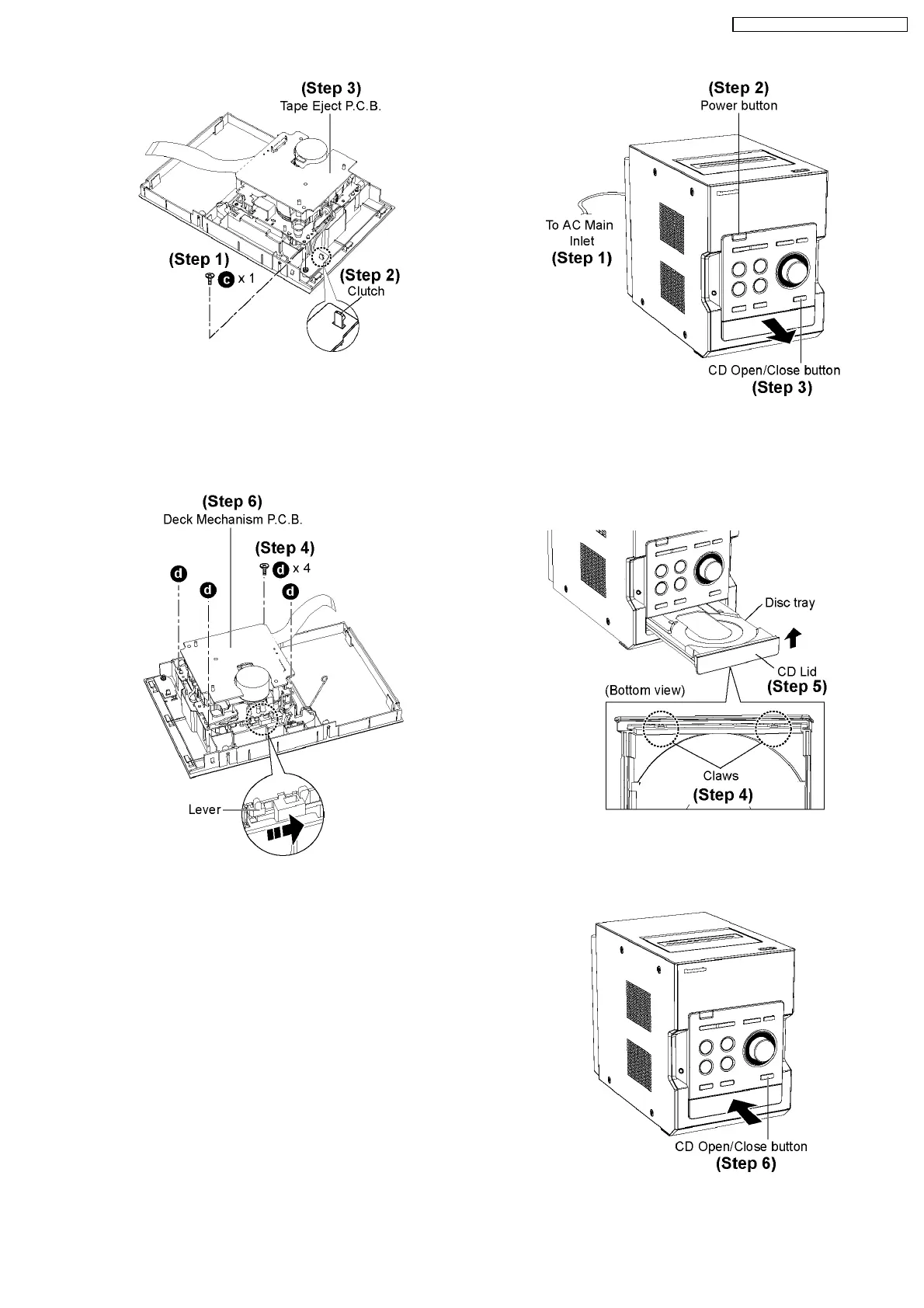
Step 1 : Remove 1 screw.
Step 2 : Release the clutch.
Step 3 : Remove the Tape Eject P.C.B.
·
Disassembly of Deck Mechanism
Step 4 : Remove 4 screws
Step 5 : Push the lever as arrow shown to open the Cassette
Lid.
Step 6 : Remove the Deck Mechanism Unit.
9.7. Disassembly of CD Lid
·
Follow the (Step 1) - (Step 6) of Item 9.4.
·
Follow the (Step 1) - (Step 3) of Item 9.5.
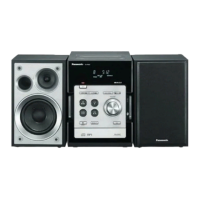
When opening the disc tray automatically (Using Power
Supply)
Step 1 : Connect the AC power cord.
Step 2 : Press the POWER button to power up the main unit.
Step 3 : Press the OPEN/CLOSE button, the disc tray will be
open automatically.
Step 4 : Release the 2 claws.
Step 5 : Remove the CD Lid as arrow shown.
Step 6 : Press the OPEN/CLOSE button, the disc tray will be
25
SA-PM45E / SA-PM45EG / SA-PM45EE








 To Next Page