close.
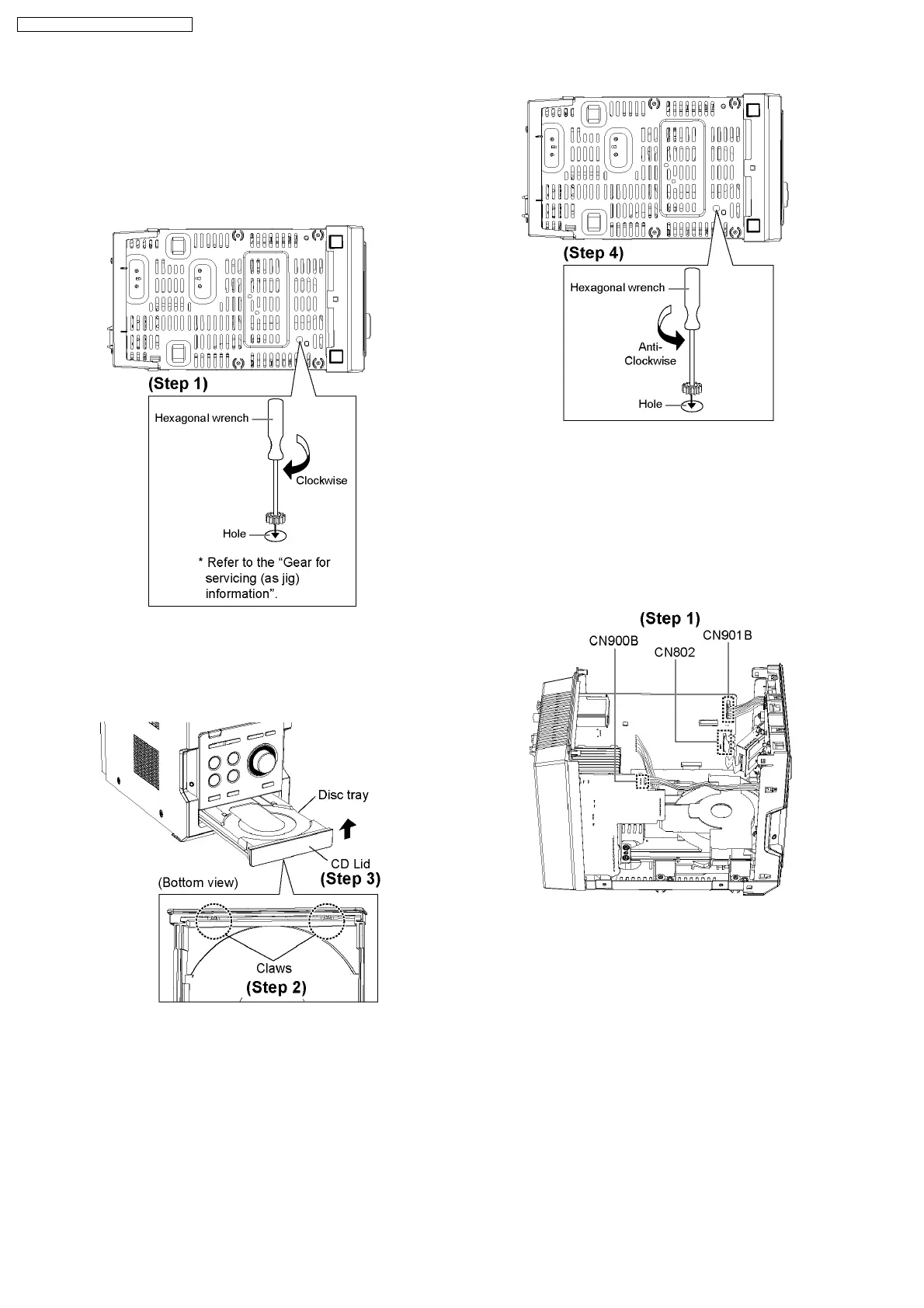
[Open the disc tray manually (Using service tools)]
Note: This method applies if failure to power up the unit for
the opening of tray.
Step 1 : Insert the gear tool into the hole on the underside of
CD chassis and then rotate in the direction of arrow. The disc
tray will be open.
Step 2 : Release the 2 claws.
Step 3 : Remove the CD Lid as arrow shown.
·
To close the CD tray.
Step 4 : Repeat Step 1 but rotate the gear tools in anti-
clockwiser
9.8. Disassembly of Front Panel
·
Follow the (Step 1) - (Step 6) of Item 9.4.
·
Follow the (Step 1) - (Step 3) of Item 9.5.
·
Follow the (Step 1) - (Step 6) of Item 9.7.
Step 1 : Detach wire cable (CN802, CN900B and CN901B).
26
SA-PM45E / SA-PM45EG / SA-PM45EE








 To Next Page