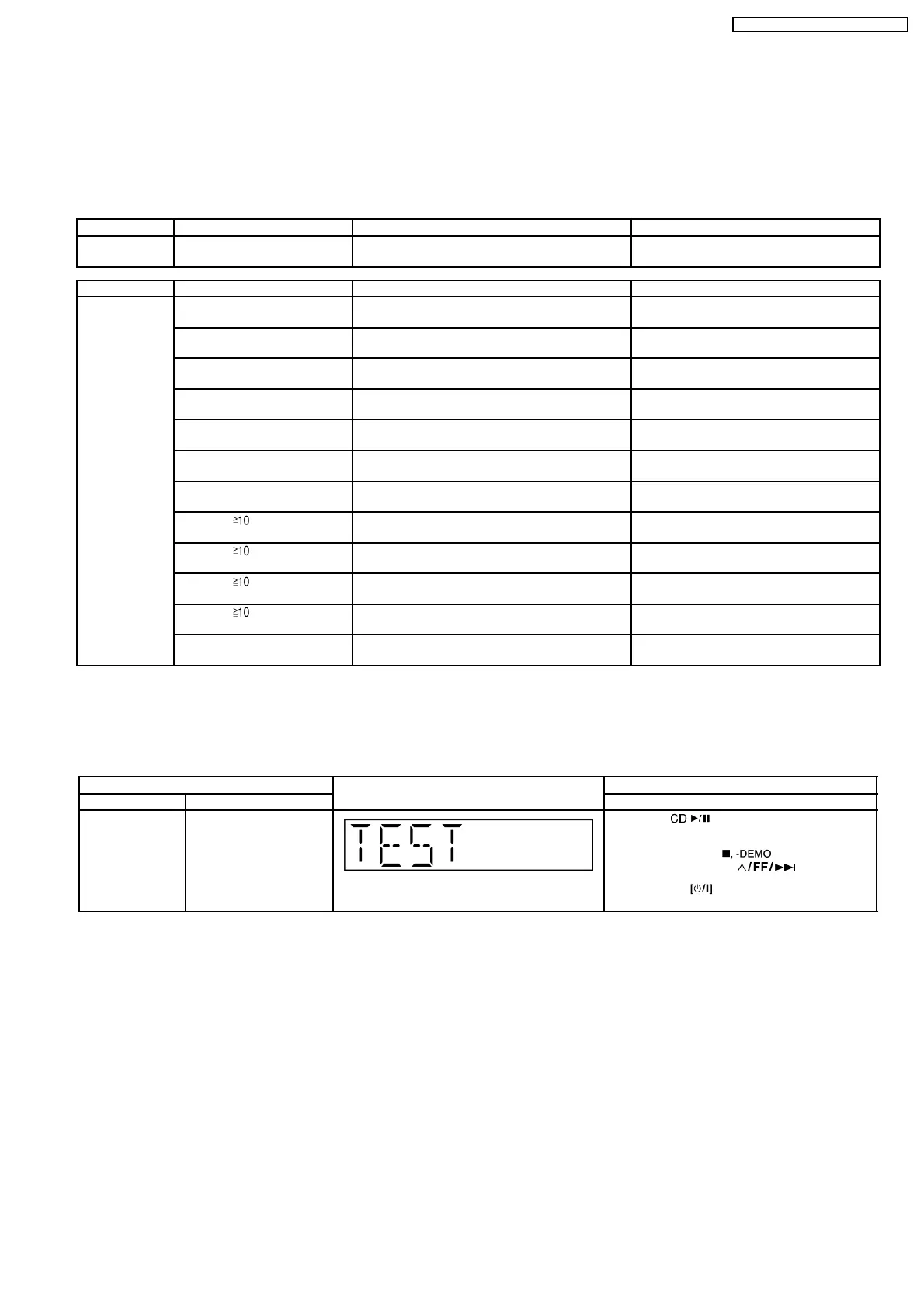
8 Self diagnosis and special mode setting
This unit is equipped with features of self-diagnostic & special mode setting for checking the functions & reliability.
8.1. Service Mode Summary Table
The service modes can be activated by pressing various button combination on the main unit and remote control unit.Below is the
summary for the various modes for checking:
Player buttons Remote control unit buttons Application Note
[STOP] [4], [7] To enter into doctor mode (Refer to the section 8.2. for more
information.)
Mode Remote control unit buttons Application Note
In Doctor Mode [DIMMER] FL ALL Segment inspection (Refer to section 8.2. service mode Table 1
& 2 for more information.)
[4] CD to Tape Recording Test Mode (Refer to section 8.2. service mode Table 1
& 2 for more information.)
[5] Tape Recording and Playing (Refer to section 8.2. service mode Table 1
& 2 for more information.)
[6] CD and Tape Eject test (Refer to section 8.2. service mode Table 1
& 2 for more information.)
[7] Volume 50 setting check (Refer to section 8.2. service mode Table 1
& 2 for more information.)
[8] Volume 29 setting check (Refer to section 8.2. service mode Table 1
& 2 for more information.)
[9] Volume 0 setting check (Refer to section 8.2. service mode Table 1
& 2 for more information.)
[ ], [1], [1] CD Loading Test Mode (Refer to section 8.2. service mode Table 1
& 2 for more information.)
[ ], [1], [2] CD Traverse Unit Test Mode (Refer to section 8.2. service mode Table 1
& 2 for more information.)
[ ], [1], [3] CD Combination Test Mode (Refer to section 8.2. service mode Table 1
& 2 for more information.)
[ ], [1], [4] CD Auto Adjustment Display (Refer to section 8.2. service mode Table 1
& 2 for more information.)
[SLEEP] Cold Start Setting (Refer to section 8.2. service mode Table 1
& 2 for more information.)
8.2. Service Mode Table
Below is the various special modes for checking:-
8.2.1. Service Mode Table 1
Item FL Display Key Operation
Mode Name Description Front Key
Self -Diagnostic
Mode
To enter into self
diagnostic checking for
main unit.
1. Select [ ] for CD mode (Ensure no
tape or CD inserted).
2. Press and hold [
]button for 2
seconds follow by [
].
To exit, press
button on main unit or
remote control.
13
SA-PM45E / SA-PM45EG / SA-PM45EE








 To Next Page