Item FL Display Key Operation
Mode Name Description Front Key
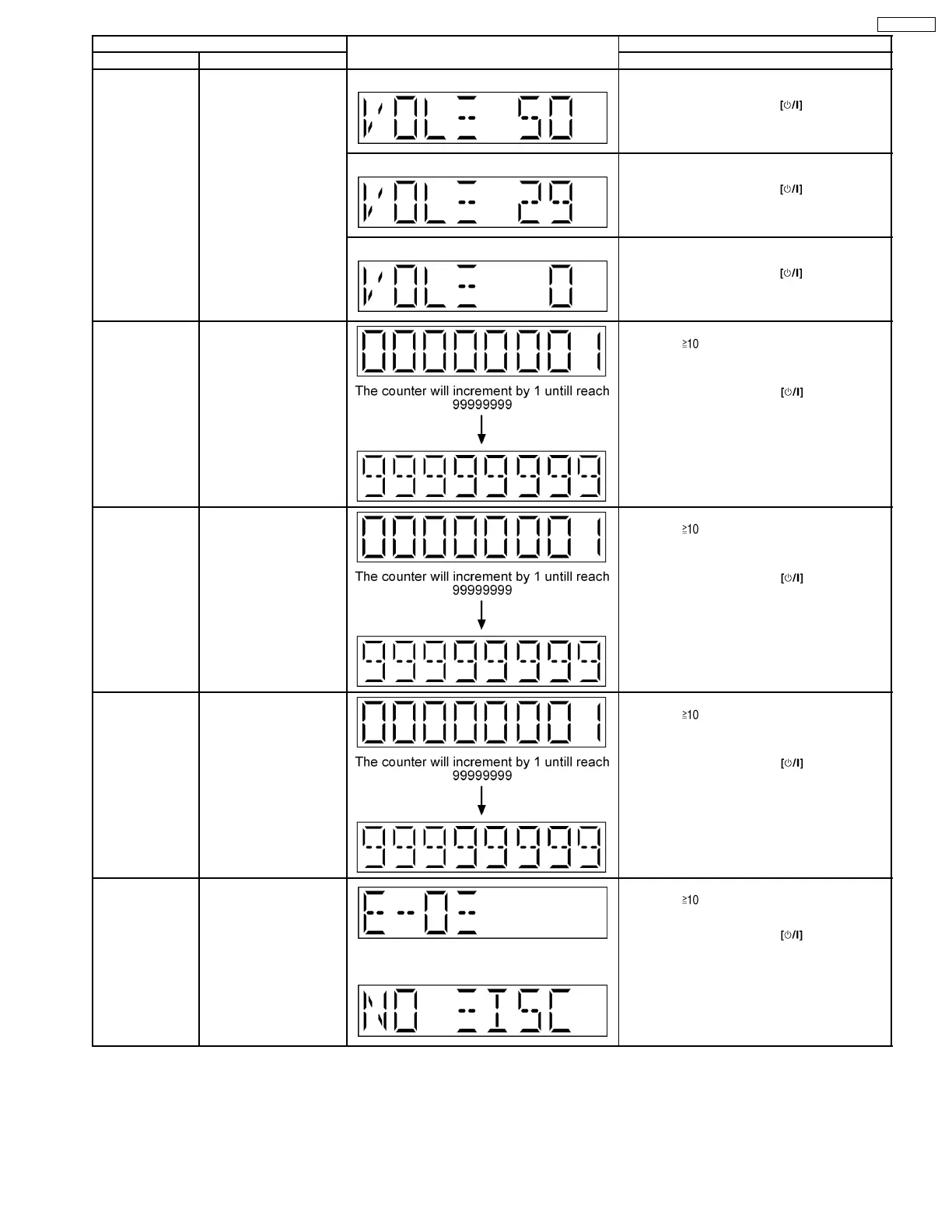
Volume Setting
Mode
To check for the volume
setting of the main unit.
The volume will be
automatically set to its
respective level (in dB).
During this mode,
treble/bass/EQ will be set
to ‘0’dB & OFF.
Display 1 In doctor mode:
1. Press [7] button on remote control.
To exit Doctor Mode, press
button on
main unit or remote control.
Display 1 In doctor mode:
2. Press [8] button on remote control.
To exit Doctor Mode, press
button on
main unit or remote control.
Display 1 In doctor mode:
3. Press [9] button on remote control.
To exit Doctor Mode, press
button on
main unit or remote control.
CD Loading Test
Mode
To determine the
reliability of CD Loading
Unit.
To check for the
open/close operation for
the CD loading unit. It
fails when there is
abnormality in opening or
closing.
In doctor Mode:
1. Press [
], [1] & [1] button on remote
control.
To cancel, press [0] button on remote control.
To exit Doctor Mode, press
button on
main unit or remote control.
CD Traverse Unit
Test Mode
To check for the traverse
unit operation. In this
made, the first & lost
track is access & read
(TOC). It fails when TOC
is not completed by IDS
or the traverse is out of
focus.
In doctor Mode:
1. Press [
], [1] & [2] button on remote
control.
To cancel, press [0] button on remote control.
To exit Doctor Mode, press
button on
main unit or remote control.
CD Combination
Test Mode
A combination of CD
loading & Traverse unit
test.
In doctor Mode:
1. Press [
], [1] & [3] button on remote
control.
To cancel, press [0] button on remote control.
To exit Doctor Mode, press
button on
main unit or remote control.
CD Auto
Adjustment
Display
To display result of self-
adjustment for CD.
(For more information,
refer to section 8.2.5)
The [NO DISC] display will appear after 3 sec.
In doctor mode:
1. Press [
], [1] & [4] button on remote
control.
To exit Doctor Mode, press
button on
main unit or remote control.
15
SA-PM45PC










 To Next Page