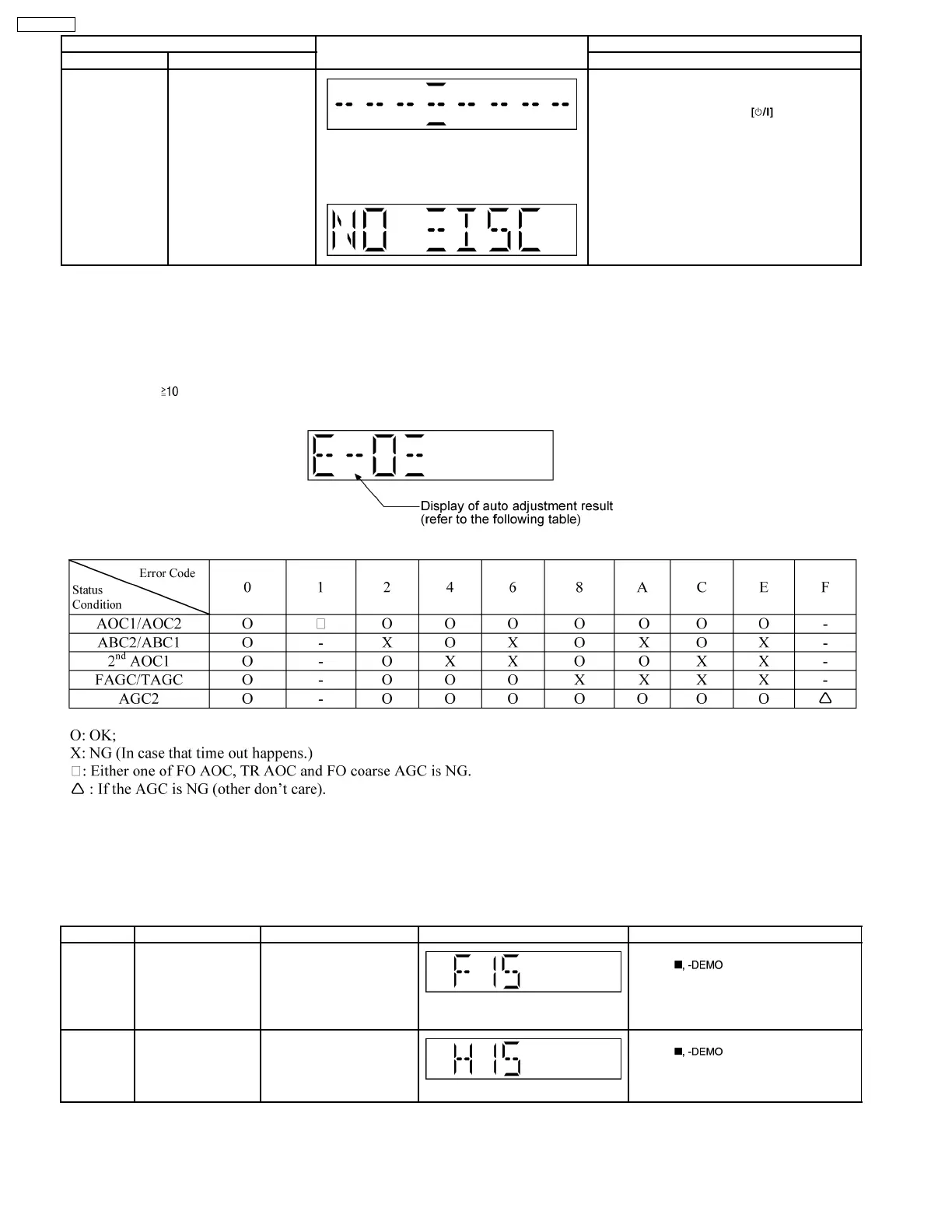
Item FL Display Key Operation
Mode Name Description Front Key
Cold Start To activate cold start
ipon next AC power up.
Note: This test do not work when selector is in
Tuner.
The [NO DISC] display will appear after 3 sec.
In doctor mode:
1. Press [SLEEP] button on remote control.
To exit Doctor Mode, press
button on
main unit or remote control.
8.2.3. CD Self-Adjustment (AJST) Result Display
Purpose : To display the result of self-adjustment for CD.
Below is the procedures for this mode:-
Step 1: Enter into Doctor mode (For more information refer to section 8.2 on key operation to enter into this mode).
Step 2 : When [
], [1] & [4] key are pressed at the doctor mode, the following shall be displayed for 3 secs. The result shall
correspond to the condition met as shown in the table below :
8.3. Error Code Table
Self-Diagnosis Function provides information on any problems occuring for the unit and its respective components by displaying
error codes. Thesed error code such as U**, H** and F** are stored in memory and held unless it is cleared.
The error code is automatically display after entering into self-diagnostic mode.
Error Code Diagnosis Contents Description of error Automatic FL Display Remarks
F15 CD REST SW
Abnormal
CD traverse position intial
setting operation failsafe
counter (1000 ms) waiting
for REST SW to turn on.
Error No. shall be clear by
force or during cold start.
For CD unit (For Traverse).
Press [
] on main unit for next
error.
H15 CD OPEN SW
Abnormal
During normal operation
CD OPEN SW ON fail to be
detected with 4 sec. Error
No. shall be clear by force
or during cold start.
For CD unit (For Traverse).
Press [
] on main unit for next
error.
16
SA-PM45PC










 To Next Page