PRUNING SHEARS C3X
26_176804-B
4.
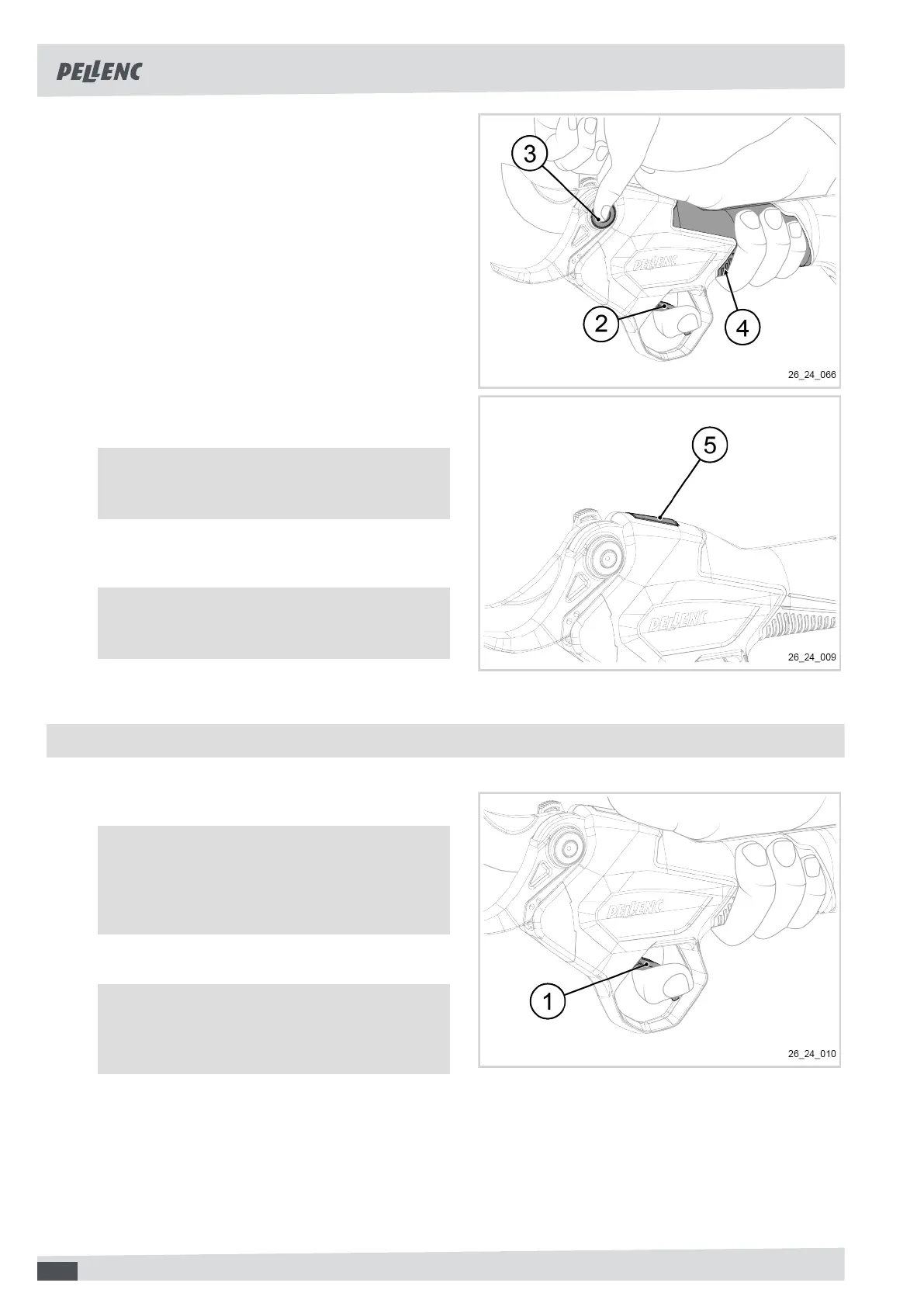
If Activ' Security is activated:
• Make sure that your fingers are in contact with the
lower conductive pad (4).
• Place the index finger of the hand holding the tool
on the trigger (2).
• Grip on both sides of the blade pin (3) with the
other hand.
• Release the blade pin (3).
The tool emits a series of beeps.
• Press the trigger (2).
5.
If Activ' Security is deactivated:
• Press the trigger (2).
6. Press the touch area (5) to switch the pruning shears
to the blade-half-open position.
Note
The tool will emit a series of beeps.
7. Press the touch area (5) again to switch to the blade-
fully-open position.
Note
The tool will emit a series of beeps.
5.4. SWITCHING THE PRUNING SHEARS TO STANDBY MODE
1. Press the trigger (1) for a long time.
Note
The status indicator light switches to flashing
green.
The tool emits a series of beeps.
2. Press the trigger (1) briefly to reactivate the tool.
Note
The status indicator light switches to steady
green.
24



 To Next Page