BRUSH CUTTER EXCELION 2 DH
53_153238-A
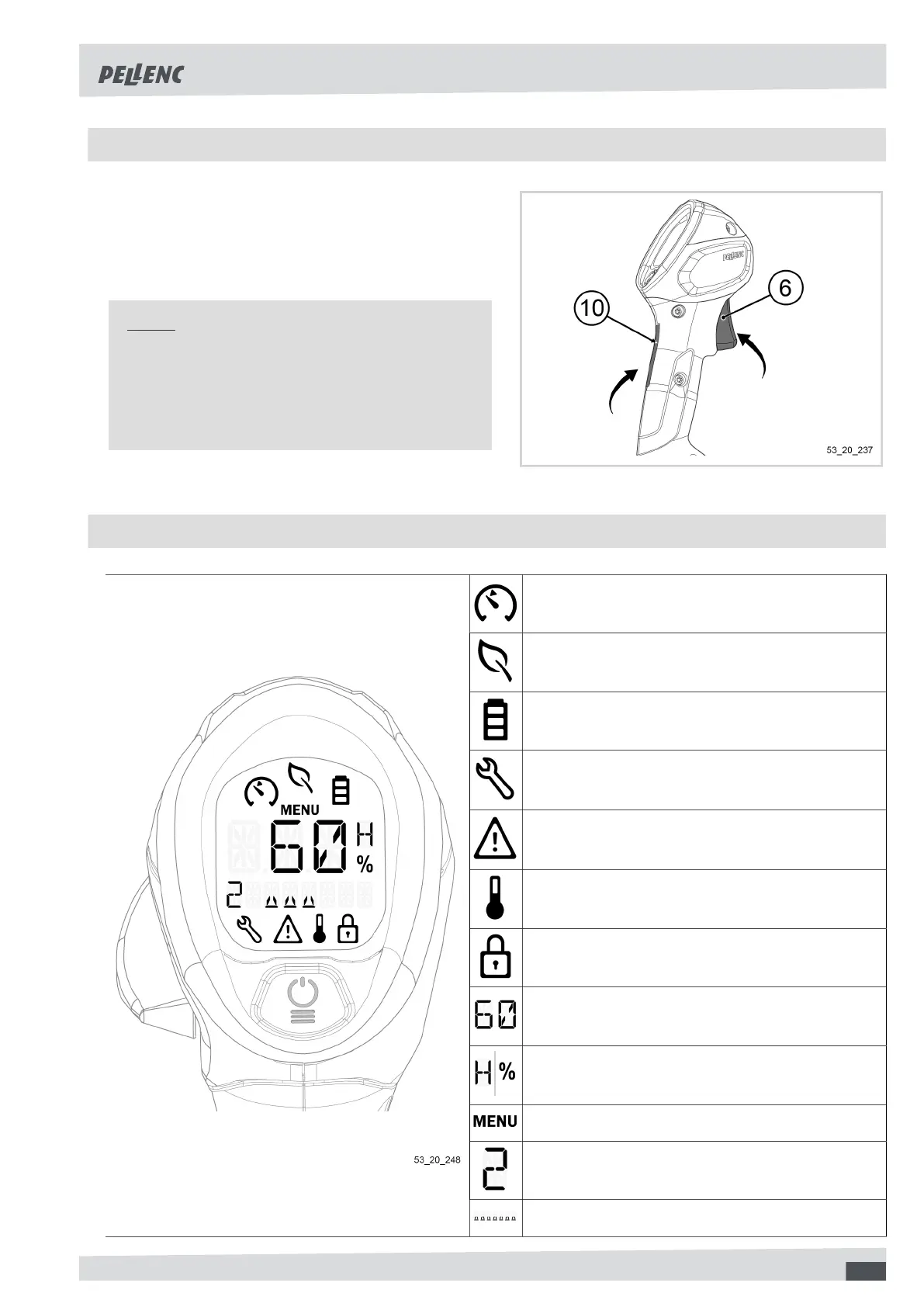
5.2. UNLOCKING OF THE TOOL
To unlock the tool,
1. Press simultaneously on the trigger (6) and the sa-
fety throttle (10).
2. Release the trigger (6). The tool is now unlocked.
Note
The tool automatically locks itself after 5 seconds
of inactivity.
The battery goes to standby after 15 minutes of in-
activity.
5.3. PRESENTATION OF THE HMI (HUMAN MACHINE INTERFACE) DISPLAY SCREEN
Speed limiter
Energy saving mode
Battery charge indicator
Schedule tool maintenance
Fault
Caution
Fault
High temperature indicator
Tool locked
Tool values
Value unit
Menu
Speed engaged
Rev counter
45


 To Next Page