21
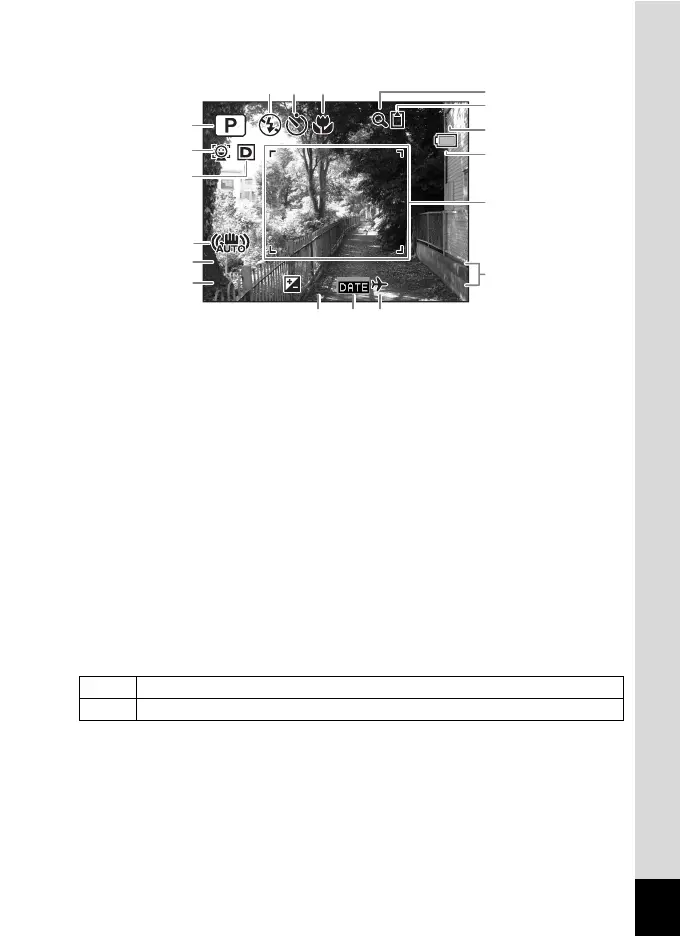
Normal Display in Still Picture Capture Mode
* 2 varies depending on the [Face Detection] setting in the [A Rec.
Mode] menu.
If set to [Off], nothing appears in 2.
1
Shooting mode (p.67)
11
Memory status (p.40)
2
Face Detection mode (p.69)
12
Remaining image storage
capacity
3
D-Range Setting (p.95)
4
Shake Reduction setting (p.102)
13
Battery level indicator (p.35)
5
Shutter speed
14
Focus frame (p.64)
6
Aperture
15
Current date and time (p.46)
7
Flash Mode (p.88)
16
EV Compensation (p.94)
8
Drive Mode (p.84, p.85)
17
Date Imprint setting (p.106)
9
Focus Mode (p.89)
18
World Time setting (p.168)
10
Digital Zoom/Intelligent Zoom
icon (p.73)
I When [Face Detection] is set to [On]
J When [Face Detection] is set to [Smile]
14:25
14:25+1.0
+1.0
38
38
03/03/2011
03/03/2011
F3.5
F3.5
1/250
1/250
15
181716
1
10
9
12
13
14
11
87
2
3
4
5
6











 To Next Page