22
* 3 varies depending on the [D-Range Setting] setting in the [A Rec.
Mode] menu.
If [Highlight Correction] and [Shadow Correction] are both set to P
(Off), nothing appears in 3.
* 4 varies depending on the following conditions.
* 5 and 6 appear only when the shutter release button is pressed
halfway.
* For 9, when the focus mode is set to = and the Auto-Macro function
is activated, the q appears on the display (p.89).
* Some indications may not appear depending on the shooting mode.
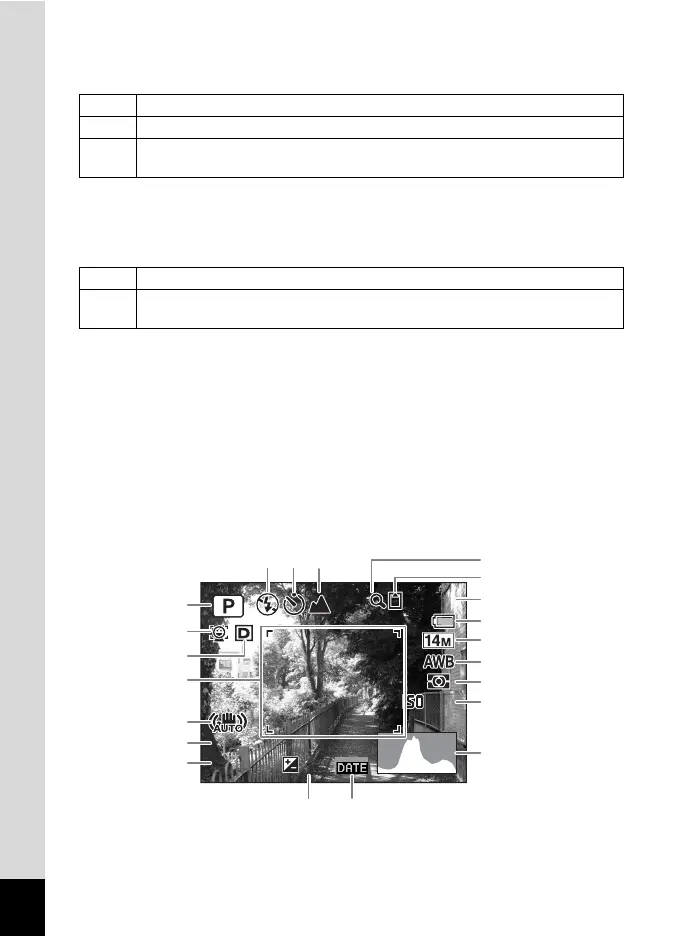
Histogram + Info/No Info Display in Still Picture Capture Mode
A1 to A18 and B1 appear when “Histogram + Info” is selected. Only B1
appears when “No Info” is selected.
P When [Highlight Correction] is set to O (On)
Q When [Shadow Correction] is set to O (On)
O
When [Highlight Correction] and [Shadow Correction] are both set to O
(On)
M When [Shake Reduction] in the [A Rec. Mode] menu is set to O (On)
l
When [Shake Reduction] is set to P (Off) (If the camera shake is likely to
occur, f is indicated when the shutter button is pressed halfway.)
F3.5
1/250
F3.5
1/250
38
38
200
200
+1.0
+1.0
+1.0
1
A5 A6 A7
2
3
B1
4
B2
B3
A17 A18
A16
A15
A14
A13
A12
A11
A10
A9
A8











 To Next Page