90
3
Taking Pictures
2
Press the 4 button.
The setting is saved and the camera returns to capture status.
1
Press the four-way controller (5) in A mode.
The [Focus Mode] screen appears.
2
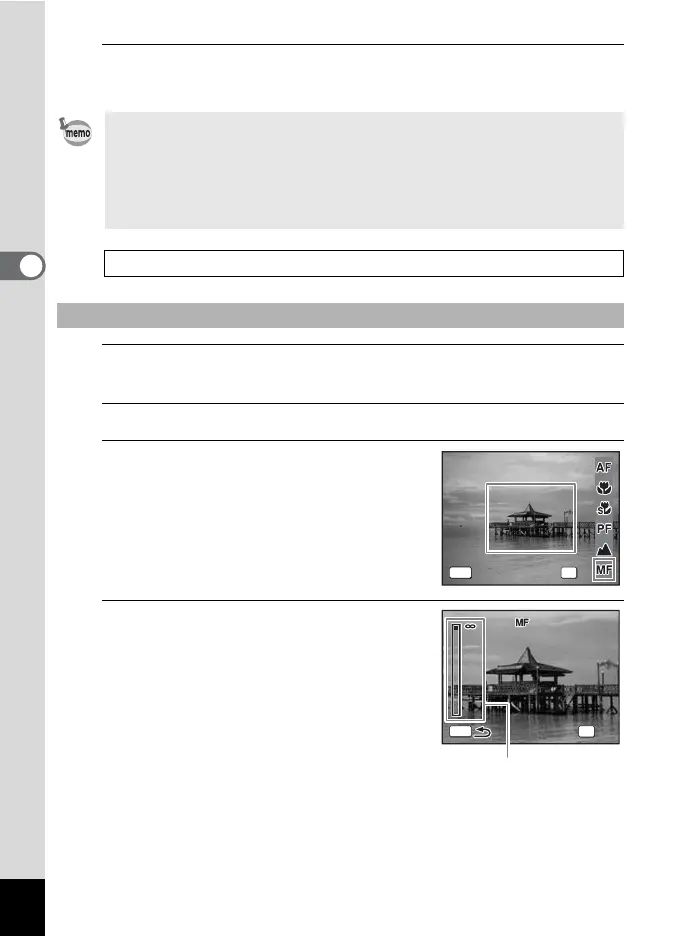
Press the four-way controller (5) to select \.
3
Press the 4 button.
The central portion of the image is
magnified to full screen on the display.
4
Use the four-way controller (23)
to adjust the focus.
The \ indicator appears on the display to
indicate the approximate distance to the
subject. Adjust the focus using the indicator
as a guide.
2 for distant focus
3 for closer focus
•In 9 (Green) mode, you can only select =, q or 3.
• The focus mode is fixed at s in S (Fireworks) mode.
• When shooting with q selected, if the subject is further than 50 cm
away, the camera automatically focuses to
∞ (Infinity). By pressing the
shutter release button fully, you can also take a picture even when the
focus is not set.
Saving the Focus Mode setting 1 p.113
To Set the Focus Manually (Manual Focus)
Focus Mode
Focus Mode
Manual Focus
Manual Focus
OK
OK
OK
MENU
Cancel
Cancel
MENU
Cancel
Cancel
MENU
Cancel
Cancel
MENU
Cancel
Cancel
MENU
Cancel
Cancel
m
1.0
MENU
OK
OK
\ indicator











 To Next Page