145
6
Settings
6 Settings
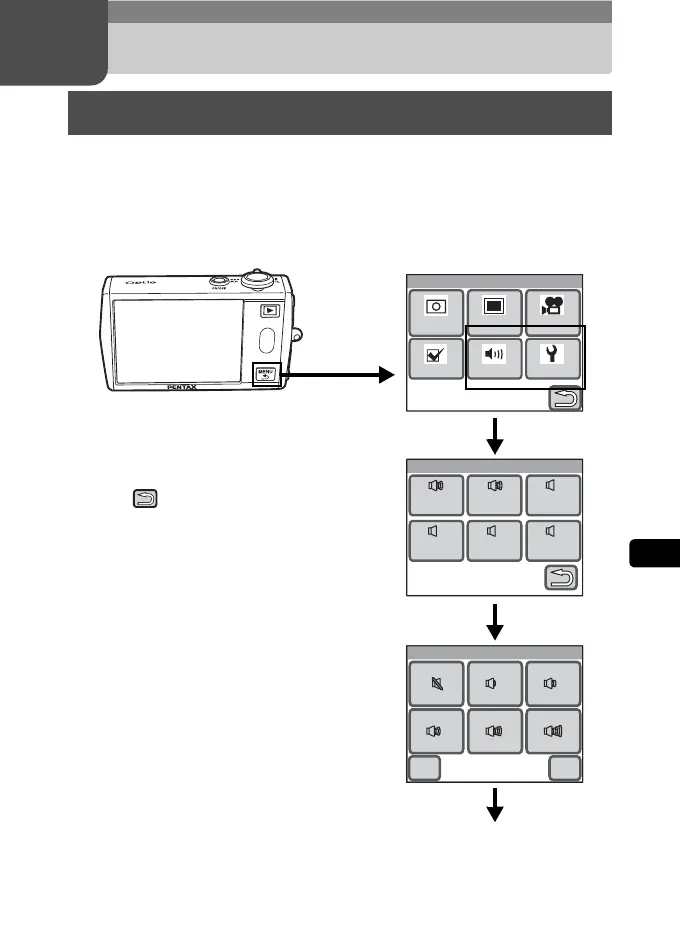
In Capture or Playback mode, press the 3 button to display the
menu for setting the various camera functions. This section explains how
to set the [Sound] and [Setting] menu items (For [Rec. Mode 1], [Rec.
Mode 2], [Movie], and [Common], refer to p.35.)
Using the Setting Menu
Menu
Rec.
Mode 1
Rec.
Mode 2
Movie
SettingSoundCommon
Sound
Operatin
Sound
Shutter
Sound
Selftime
Sound
Playback
Volume
Operatin
Volume
Start-up
Sound
11
1
11111
Cancel
Operation Volume
OK
Continue with operations while following the on-screen guidance.
Press the
3 button.
Touch the
desired icon.
Touch the
desired icon.
Touch the
desired icon.
[Menu]
• Press the shutter release button to return to
Capture mode.
• Touch to return to the previous screen.
• If no operation is performed for a certain
period of time, the camera returns to Capture
mode or Playback mode.



 To Next Page