85
4
Playing Back and Editing Images
4 Playing Back and Editing Images
Press the
Q
button to switch from Capture mode to Playback mode. In Playback
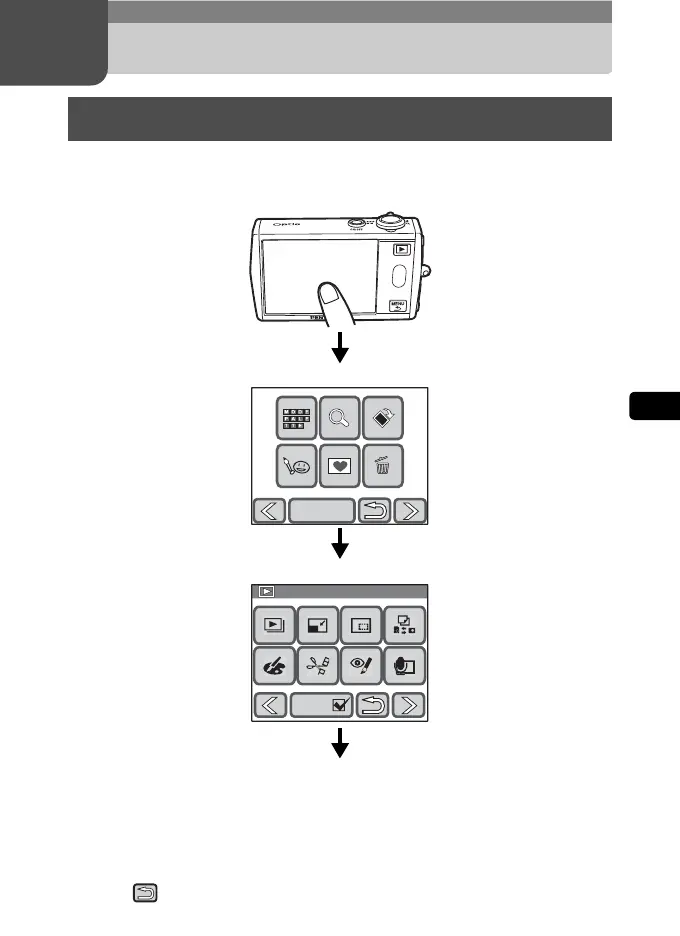
mode, you can use the [Playback Toolbar] to set the playback functions.
• On the [Playback Palette], touch an icon with the guide checkbox checked to
display the guide display. To skip the guide display, double-touch the icon.
• If no operation is performed for a certain period of time, the camera returns to
Playback mode.
• Press the shutter release button (fully or halfway) to switch to Capture mode.
• Touch to return to the previous screen.
Setting the Playback Functions
DISPLAY
1/2
1/2
Playback Palette
Playback Palette
Guide
Guide
Touch the LCD monitor.
Continue with operations while following the on-screen guidance.
Touch the desired icon.
Touch the desired icon.
[Playback Toolbar]
[Playback Palette]



 To Next Page