34
3
Taking Pictures
3 Taking Pictures
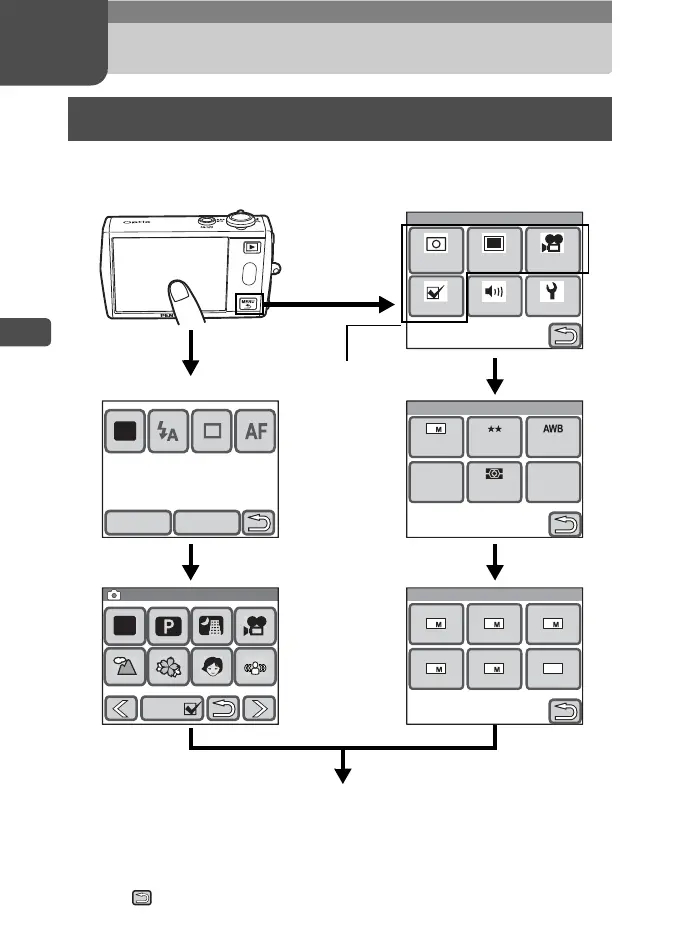
In Capture mode, press the 3 button or touch the LCD monitor to
display the shooting settings.
• On the [Capture Palette], touch an icon with the guide checkbox checked to
display the guide display. To skip the guide display, double-touch the icon.
• If you press the shutter release button or no operation is performed for a certain
period of time, the camera returns to Capture mode.
• Press the Q button to switch to Playback mode.
• Touch to return to the previous screen.
Setting the Shooting Functions
Memo PadDISPLAY
AUTO
PICT
Guide
1/2
1/2
Capture Palette
Capture Palette
AUTO
PICT
Guide
Menu
Rec.
Mode 1
Rec.
Mode 2
Movie
SettingSoundCommon
Rec. Mode 1
Recorded
Pixels
Quality
Level
White
Balance
AUTO
400
Sensi-
tivity
AE
Metering
7
AF
Setting
AF
Recorded Pixels
3 2 640
57 4
Touch the LCD
monitor.
Continue with operations while following the on-screen guidance.
Touch the
desired icon.
Touch the desired icon.
These four icons
provide shooting-
related functions.
Press the
3 button.
Touch the
desired icon.
Touch the
desired icon.
Touch the
desired icon.
[Menu]
[Capture Toolbar]



 To Next Page