Playing Back Images, Movies, and Sound Files
93
4
Playing Back and Editing Images
You can display nine captured images or sound files on the LCD monitor
at a time.
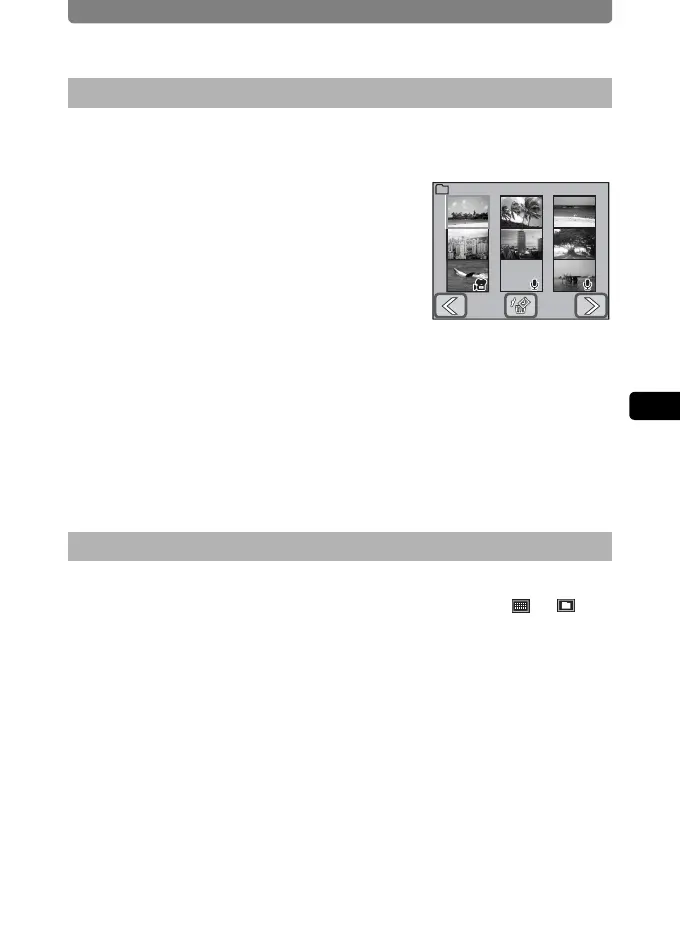
1 In Playback mode, turn the zoom
lever toward f.
• Nine-image display appears.
The icons that appear on the thumbnails
indicate the following:
No icon : Image without sound
O (with image) : Image with sound
C : Movie (first frame appears)
O (without image) : Sound-only file
• Touch the arrow icons (qr) to change the nine thumbnail images to
another nine images.
• Touch the o (Select & Delete) icon to switch to the selection and
deletion screen (p.104).
2 Touch a thumbnail in nine-image display.
The selected file is displayed in single-image display.
Turn the zoom lever towards f when in the 9-image display to switch to
the folder display or the calendar display. You can use the or on
the bottom of the screen to switch the folder and calendar displays.
1 In Playback mode, turn the zoom lever toward f.
The display switches to nine-image display.
2 Turn the zoom lever toward f.
The display switches to the folder display or the calendar display.
Nine-image Display
Switching between folder and calendar display
1/10100
PENTX



 To Next Page