Selecting a Shooting Mode
44
3
Taking Pictures
Memo
• When Shooting mode is set to E (Pet), [Flash Mode] is set to a (Flash Off).
However, the flash mode can be changed.
• When Shooting mode is set to < (Flower), E (Pet), C (Kids), D (Food) or
B (Text), [Focus limiter] is set to Off, but the setting can be changed.
• When Shooting mode is set to Y (Frame Composite), the number of
recorded pixels is fixed at h and cannot be changed.
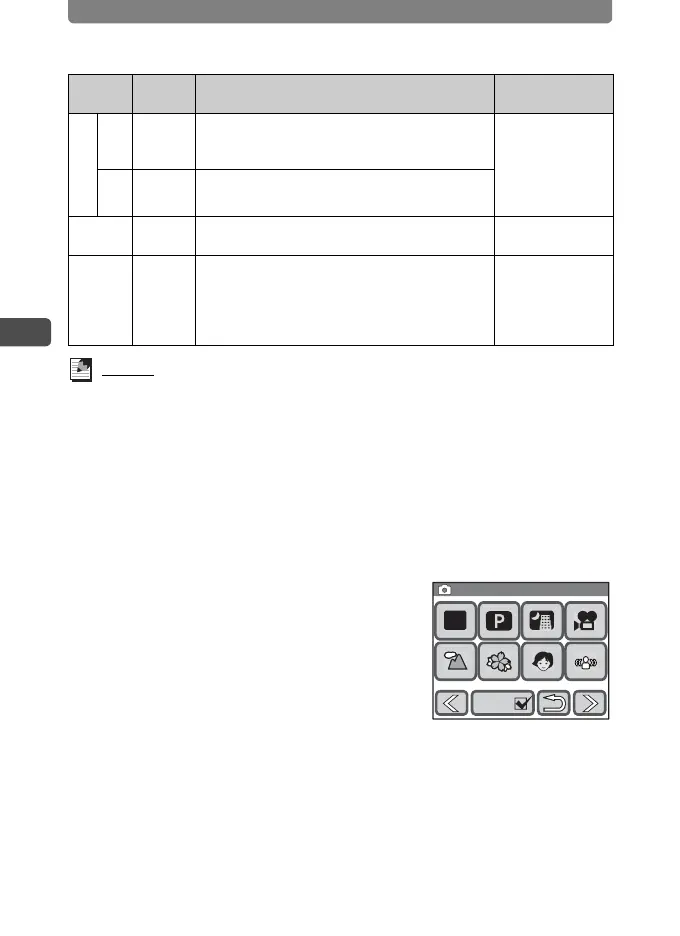
1 In Capture mode, touch the LCD monitor.
The [Capture Toolbar] appears.
2 Touch the Shooting Mode (e.g. b).
• The icon of the currently selected shooting
mode appears on the [Capture Toolbar].
• The [Capture Palette] appears.
• Touch the arrow icons (qr) to advance
to other shooting modes.
B Text
For taking sharp pictures of text. Pictures can
also be reproduced in black and white or
reversed as desired.
White Balance,
Sharpness,
Saturation,
Contrast, AE
Metering
D Food
The camera increases the saturation for bright,
vivid pictures of food.
c
Digital
SR
For reducing camera shake and taking pictures
at a higher ISO sensitivity.
Sensitivity
Y
Frame
Compo-
site
For shooting composite images using picture
frames stored in the camera (p.52).
Cont. Shooting,
Recorded Pixels,
Quality Level,
Auto Bracket,
Auto-Tracking AF
Icon
Shooting
Mode
Description
Functions Not
Available
Picture Mode
Guide
1/2
1/2
Capture Palette
Capture Palette
AUTO
PICT
Guide



 To Next Page