136
4
Taking Pictures
While recording a movie, you can compensate for camera movement
with the Movie SR (Movie Shake Reduction) function.
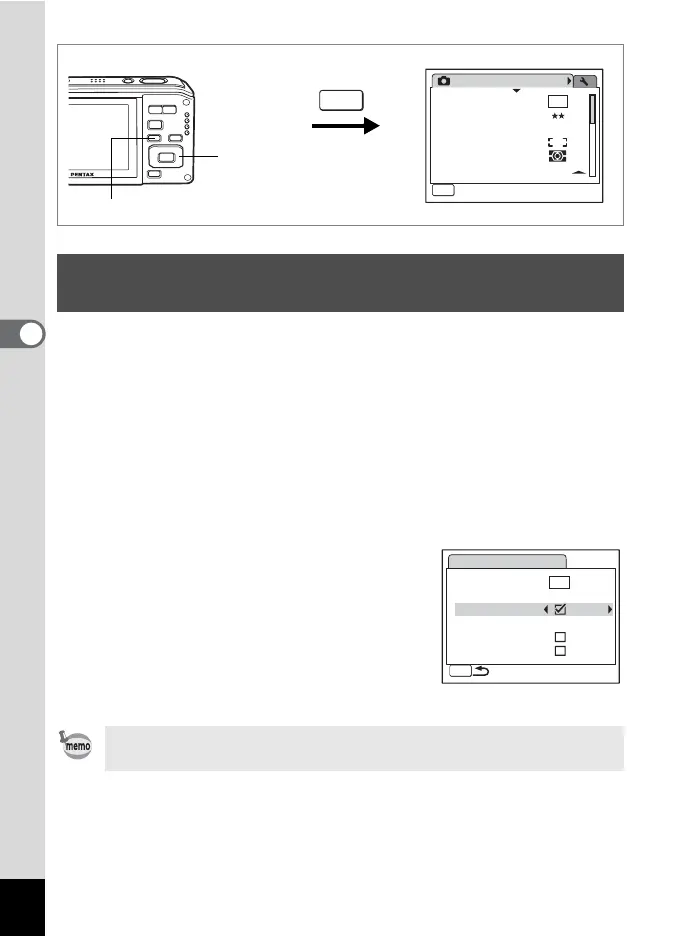
1 Press the 3 button in A mode.
The [A Rec.Mode] menu appears.
2 Use the four-way controller (23) to select [Movie].
3 Press the four-way controller (5).
The Movie screen appears.
4 Use the four-way controller (23) to select [Movie SR].
5 Use the four-way controller (45)
to select O (On) or P (Off).
The Movie SR (Movie Shake Reduction)
setting is saved.
6 Press the 3 button twice.
The camera returns to capture status with
the current setting.
Setting the Movie SR (Movie Shake Reduction)
Function
Setting Movie SR to O (On) makes the captured area smaller than
with P (Off).
MENU
MENU
1/3
10
M
AWB
AUTO
800
Rec.Mode
Recorded Pixels
Quality Level
White Balance
AF Setting
AE Metering
Sensitivity
Exit
3 button
Four-way controller
MENU
1280
15
15
Movie
Recorded Pixels
Color Mode
Full Color
Movie SR
Interval Shoot
AF w/ recording
Optical Zoom










 To Next Page