185
4
Playing Back and Deleting Images
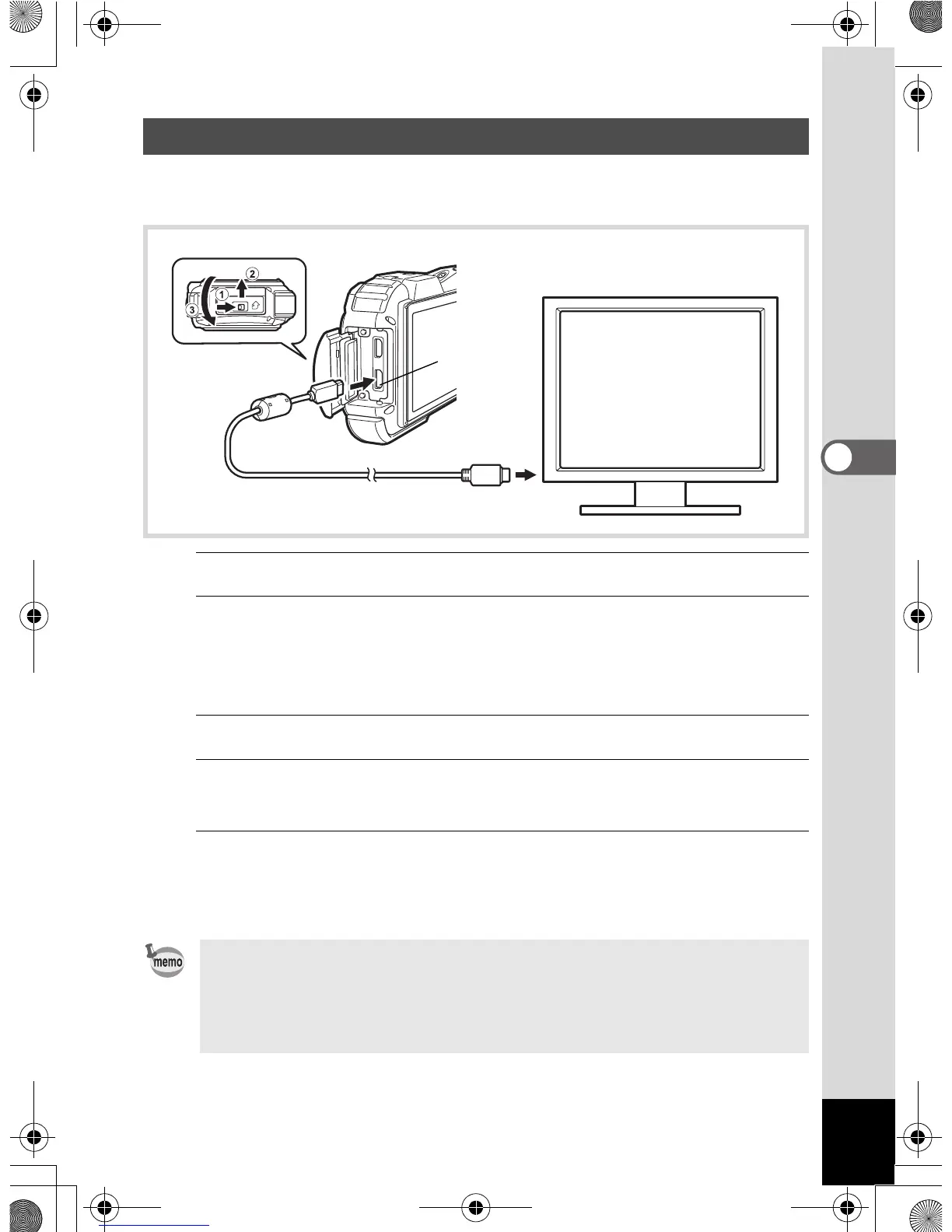
Use a commercially available HDMI cable to connect the camera to a
device with an HDMI terminal.
1
Turn the AV device and camera off.
2
Open the terminal cover.
Move the terminal cover lock lever in the direction shown by 1, slide
the cover in the direction shown by 2 and open the cover in the
direction shown by 3.
3
Connect the HDMI cable to the HDMI terminal.
4
Connect the other end of the HDMI cable to the HDMI IN
jack on the AV device.
5
Turn the AV device and camera on.
The camera information is displayed on the screen of the connected
AV device.
Connecting the Camera to an HDMI Terminal
• The camera has a Type D (Micro) HDMI terminal. Use a commercially
available HDMI cable that matches your AV device.
• If you playback the movie by connecting the camera to an AV device
with a commercially available HDMI cable, set the output format to
“Selecting the HDMI Output Format” (p.245).
HDMI
terminal
OptioWG1_eng.book Page 185 Friday, March 11, 2011 4:10 PM



 To Next Page
 Loading...








