130
4
Playing Back and Deleting Images
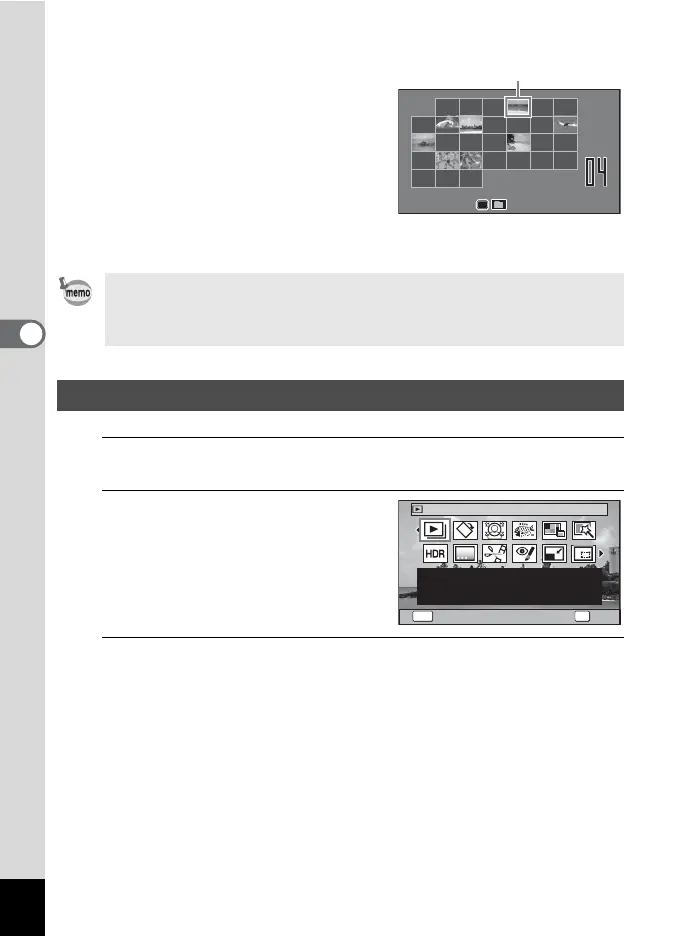
Calendar display
Stored images are displayed by date in
calendar format.
The first image captured on a date is
displayed for that date on the calendar.
Use the four-way controller (2345) to
move the frame.
If you select a date and press the y button,
the images captured on that date are
displayed in 12-image display.
Select a date and press the 4 button to switch to single-image display of the
first image captured on that date.
1
In Q mode, press the four-way controller (3).
The Playback Mode Palette appears.
2
Use the four-way controller
(2345) to choose an icon.
The guide for the selected function appears
below.
3
Press the 4 button.
The playback function is recalled.
•Press the 3 button in folder display or calendar display to switch to
12-image display.
•Press the Q button or press the shutter release button halfway in folder
display or calendar display to switch to A mode.
Using the Playback Functions
1
SUN
TUE
WED
THU
FRI
SAT
6
7
4
5
8
9
10
13
14
11
12
15
16
17
20
21
18
19
22
23
29
30
24
27
28
25
26
3
MON
2
2013
2013
Frame
OKMENU
1/2
For continuously playing
back images. Screen or
sound effects can be set
OKCancel
Slideshow



 To Next Page
 Loading...









