144
4
Playing Back and Deleting Images
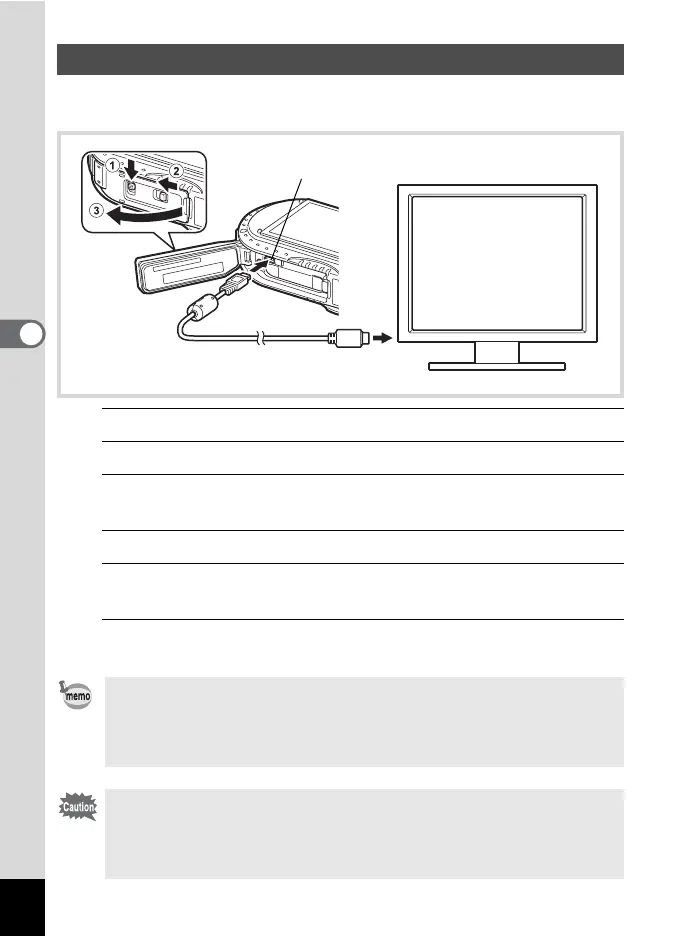
Use a commercially available HDMI cable to connect the camera to a device with
an HDMI terminal.
1
Turn the AV device and camera off.
2
Slide the battery cover lock as indicated by
1
, and release the lock.
3
Slide the release latch as indicated by 2, and open the battery
cover towards 3.
4
Connect the HDMI cable to the HDMI terminal.
5
Connect the other end of the HDMI cable to the HDMI terminal
on the AV device.
6
Turn the AV device and camera on.
The camera information is displayed on the screen of the connected AV device.
Connecting the Camera to an HDMI Terminal
• The camera has a Type D (Micro) HDMI terminal. Use a commercially
available HDMI cable that matches your AV device.
• If you play back movies by connecting the camera to an AV device with a
commercially available HDMI cable, set the output format to “Selecting the
HDMI Output Format” (p.181).
Close the battery cover securely when not using the terminal.
<How to close the battery cover>
Close the cover, slide the release latch in the opposite direction indicated by
2, and then slide the battery cover lock in the opposite direction indicated by
1 until it clicks.
HDMI terminal



 To Next Page
 Loading...









