27
1
Getting Started
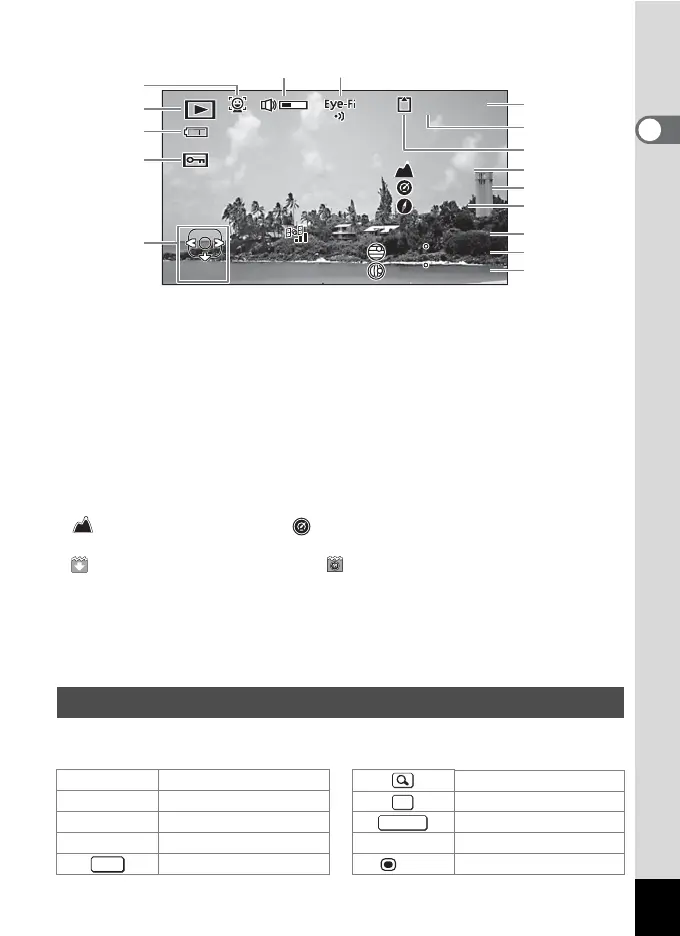
Info 2 in Playback Mode (displayed only on the PENTAX WG-3 GPS)
* 6 appears only when the volume is being adjusted during playback of movies (p.127).
* “-” appears at 11 and 12 when [Pressure Sensor] is set to [Off] (p.190).
* (height) appears at 11 and (air pressure) at 12 when [Not underwater]
is selected for [Camera Location] in [Pressure Sensor].
(water depth) appears at 11 and (underwater pressure) at 12 when
[Underwater] is selected for [Camera Location] in [Pressure Sensor] (p.190).
* 13 displays the lens direction during shooting. "0°" is displayed when the lens
pointed to the north at the time of shooting (p.24).
* 14 is displayed in GPS time (the reference time scale of the GPS system). This
may be different from the time you have set on the camera.
A guide indicator for each available button or key operation appears as follows on
the display during operation.
1 Face Detection icon 9 Folder number
2 Playback mode 10 Memory status
3 Battery level indicator 11 Height
4 Protect icon 12 Air pressure
5 Four-way controller guide 13 Lens direction
6 Volume icon 14 GPS time
7 Eye-Fi communication status 15 GPS latitude
8 File number 16 GPS longitude
Guide Display
2 Four-way controller (2) Zoom button
3 Four-way controller (3) 4 button
4 Four-way controller (4) Shutter release button
5 Four-way controller (5) X (green),
i Green/i button
3 button
(red) Movie button
10
003
100
-
0038
139
139
35
35
41' 29"
41' 29"
N
W
45' 52"
45' 52"
06: 25
:
00
04/04/'13
04/04/'13
Edit
Edit
3200
3200
m
ɋ
180
180
700
hPa
700
hPa
1
2
3
4
5
8
10
9
6
7
11
12
13
14
15
16
OK
SHUTTER
MENU



 To Next Page
 Loading...









