Calibrating I/O
199 IOLAN DS1/TS2 User’s Guide, Version 4.3
Calibrating Analog Channels
Analog Input can be calibrated for Analog and Temperature IOLAN models.
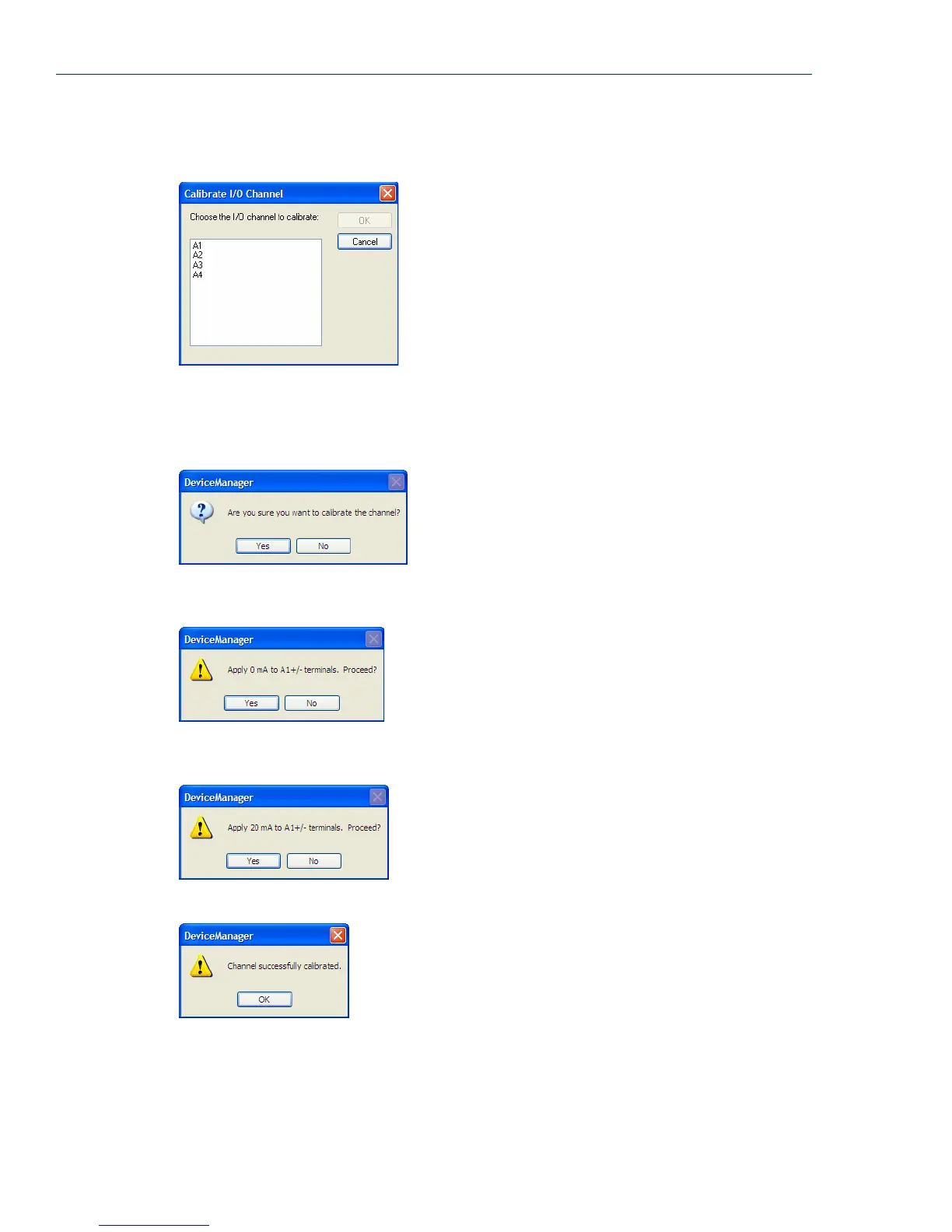
Select the channel you want to calibrate. This example uses an A4 model that has channel A1 set to
Current with a Range of 0 to 20mA.
If you have not disabled confirmation messages (Tools, Options in DeviceManager only), you will
get prompted to verify channel calibration.
Click Yes to proceed with calibration. You are now prompted to apply 0 mA to the positive (+) and
negative (-) terminals. Once that is done, click
Yes to proceed.
You are now prompted to apply 20 mA to the positive (+) and negative (-) terminals. Once that is
done, click
Yes to proceed.
Once calibration is successfully completed, click OK to finish the process.
Resetting Calibration Data
You can reset the I/O channels calibrations to the factory calibrations in DeviceManager by selecting
Tools, I/O Channels, Reset Calibrate Data or in WebManager by selecting Administration, Reset,
I/O Calibration.



 To Next Page