Explorer Mini Repairs - Base module
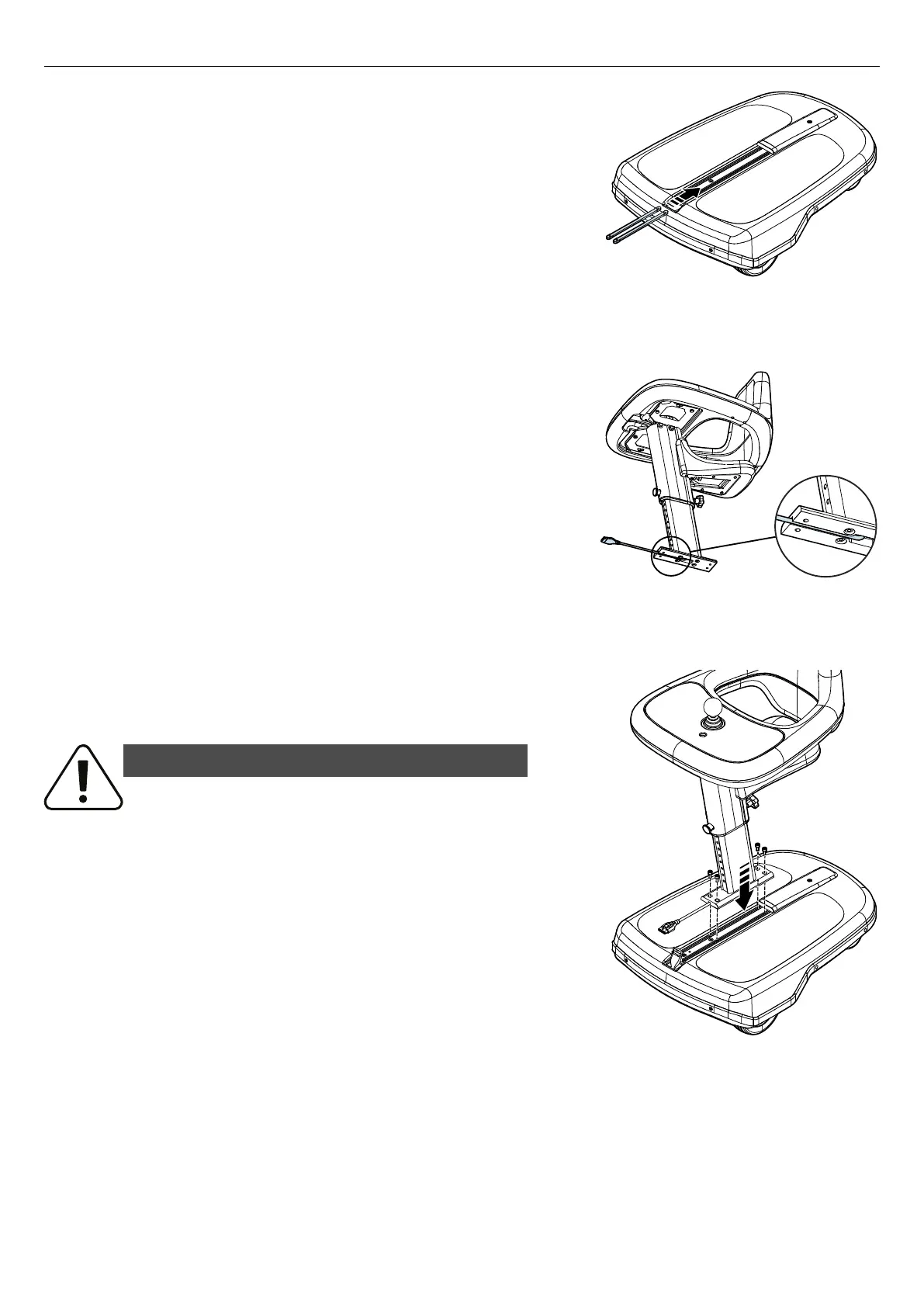
Figure 51. Put the two slide nuts into the grooves of the
UniTrack®.
6. Put the two slide nuts into the grooves of the UniTrack® at the
front of the base module and push the slide nuts until they reach the
cover on the UniTrack® at the rear of the base module. If
necessary, use a screwdriver to grip the holes in the slide nuts.
Figure 52. Put the cable into the groove of the column
assembly´s bracket.
7. Put the cable to the control panel into the groove of the column
assembly´s bracket.
Figure 53. Attach the column assembly on the base
module.
8. Put the column assembly on the base module and attach it with the
four screws. Tightening torque: 7.2 lb. ft.
WARNING!
Use recommended tightening torque
Use the recommended tightening torque to reduce the risk of damage to the
wheelchair and to prevent causing injury to the user.
31



 To Next Page