EasyManua.ls Logo

Pfeiffer Vacuum DCU 310 - User Manual

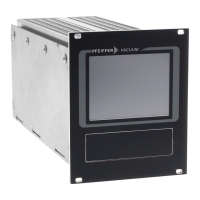
Pfeiffer Vacuum DCU 310
38 pages
Print Icon
To Next Page IconTo Next Page
Loading...
OPERATING INSTRUCTIONS
EN
Translation of the Original
DCU 002 I 110 | 180 | 310 | 400
Display Control Unit

Table of Contents

Question and Answer IconNeed help?

Do you have a question about the Pfeiffer Vacuum DCU 310 and is the answer not in the manual?

Summary

2 Safety

2.1 General safety instructions

Outlines the four risk levels and one information level used in the document.

2.2 Safety instructions

Provides safety instructions based on risk assessment and directives.

2.3 Safety precautions

Details precautions for safe handling and use of the product.

2.4 Limits of use of the product

Specifies environmental and operational limits for the product.

4 Installation

4.3 Connecting the electrical supply

Guides on safely connecting the electrical supply to the DCU.

4.3.1 Connection diagram

Illustrates the wiring diagrams for connecting the DCU.

4.3.3 Connect DCU to a vacuum pump

Provides instructions on connecting the DCU to a vacuum pump.

5 Parameter set

6 Operation

6.2 Switching on the DCU

Provides instructions on how to switch the DCU on safely.

6.3 Displaying and configuring parameters with the DCU

Details how to navigate and modify parameters using the DCU interface.

6.4 Switching on the connected vacuum pump

Explains how to operate the vacuum pump via the DCU.

6.6 Switching off the connected vacuum pump

Describes the procedure for safely switching off the vacuum pump.

7 Maintenance

8 Malfunctions

8.2 Error codes

Lists and explains error codes and how to handle fault messages.

Summary

2 Safety

2.1 General safety instructions

Outlines the four risk levels and one information level used in the document.

2.2 Safety instructions

Provides safety instructions based on risk assessment and directives.

2.3 Safety precautions

Details precautions for safe handling and use of the product.

2.4 Limits of use of the product

Specifies environmental and operational limits for the product.

4 Installation

4.3 Connecting the electrical supply

Guides on safely connecting the electrical supply to the DCU.

4.3.1 Connection diagram

Illustrates the wiring diagrams for connecting the DCU.

4.3.3 Connect DCU to a vacuum pump

Provides instructions on connecting the DCU to a vacuum pump.

5 Parameter set

6 Operation

6.2 Switching on the DCU

Provides instructions on how to switch the DCU on safely.

6.3 Displaying and configuring parameters with the DCU

Details how to navigate and modify parameters using the DCU interface.

6.4 Switching on the connected vacuum pump

Explains how to operate the vacuum pump via the DCU.

6.6 Switching off the connected vacuum pump

Describes the procedure for safely switching off the vacuum pump.

7 Maintenance

8 Malfunctions

8.2 Error codes

Lists and explains error codes and how to handle fault messages.

Pfeiffer Vacuum DCU 310 Specifications

General IconGeneral
BrandPfeiffer Vacuum
ModelDCU 310
CategoryControl Unit
LanguageEnglish

Related product manuals