PHILIPS 4000 and 3000 05 SERVICE MODE
4/18
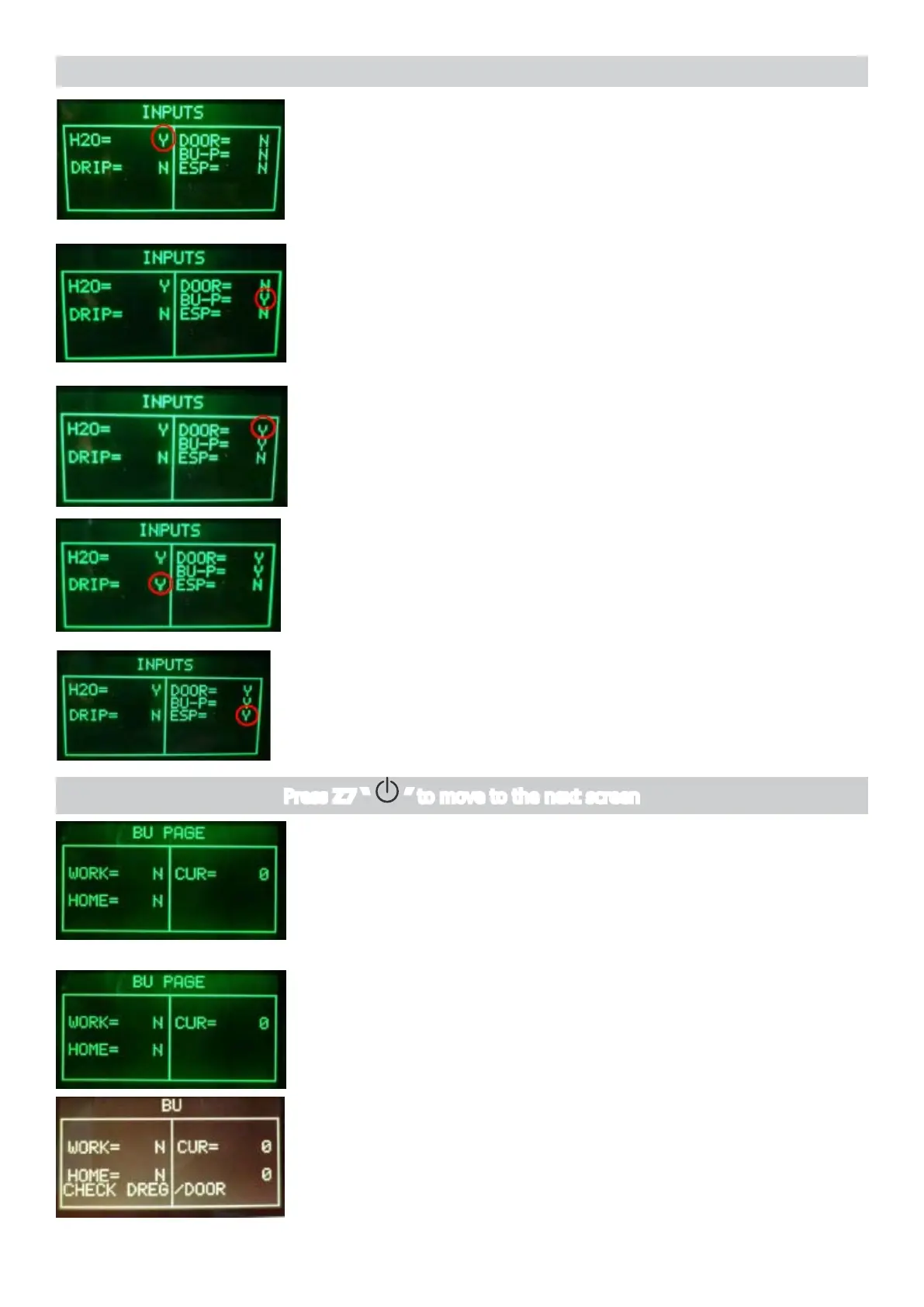
InsertafullWaterTank
The indication H20 changes from “N” to “Y”.
Note: the switching from “N” to “Y” requires about 1-2 seconds.
ERROR: The indication TANK-H2O doesn’t change; check the
capacitivesensor(xing)andthewiring(JP23)
Insert the BrewUnit
The indications BU-P changes from “N” to “Y”.
Note: removing the BrewUnit the indication from “Y” to “N” requires
about 2-3 seconds to switch.
ERROR:ChecktheBUpresenceMicroswitchandthewiring(JP16).
Close the Door and Dreg Drawer
The indication DOOR change from “N” to “Y”
ERROR: The indication DOOR does not change; check
theMicroswitchforthedoorandthewiring(JP14).
Note: without the Dreg Drawer correctly inserted the DOOR indica-
tion cannot change!
Move the lever in Espresso position
The indication ESP change from “N” to “Y”
ERROR: The indication ESP does not change; check the Lever
sensor,theconnectorinPCBinterface(JP4)orthecabling
between Lever sensor and interface.
Move Lever to Coffee Position
The indication DRIP change from “N” to “Y”
ERROR: The indication DRIP does not change; check the Lever
sensor,theconnectorinPCBinterface(JP4)orthecabling
between Lever sensor and interface
The machine passes to the Page 3 (BU PAGE)
Press Z7 “ ” to move to the next screen
Page 3 (BU)
Start condition
PresstheZ1buttontomovetheBUtoWork
IMPORTANT NOTE: If the DREGDRAWER is not inserted or the
DOOR is not closed the BU test cannot be performed. If these 2
inputsarenotintherightposition,awarningmessagewillbe
shown and the display turns to yellow.





 To Next Page