PHILIPS 4000 and 3000 05 SERVICE MODE
15/18
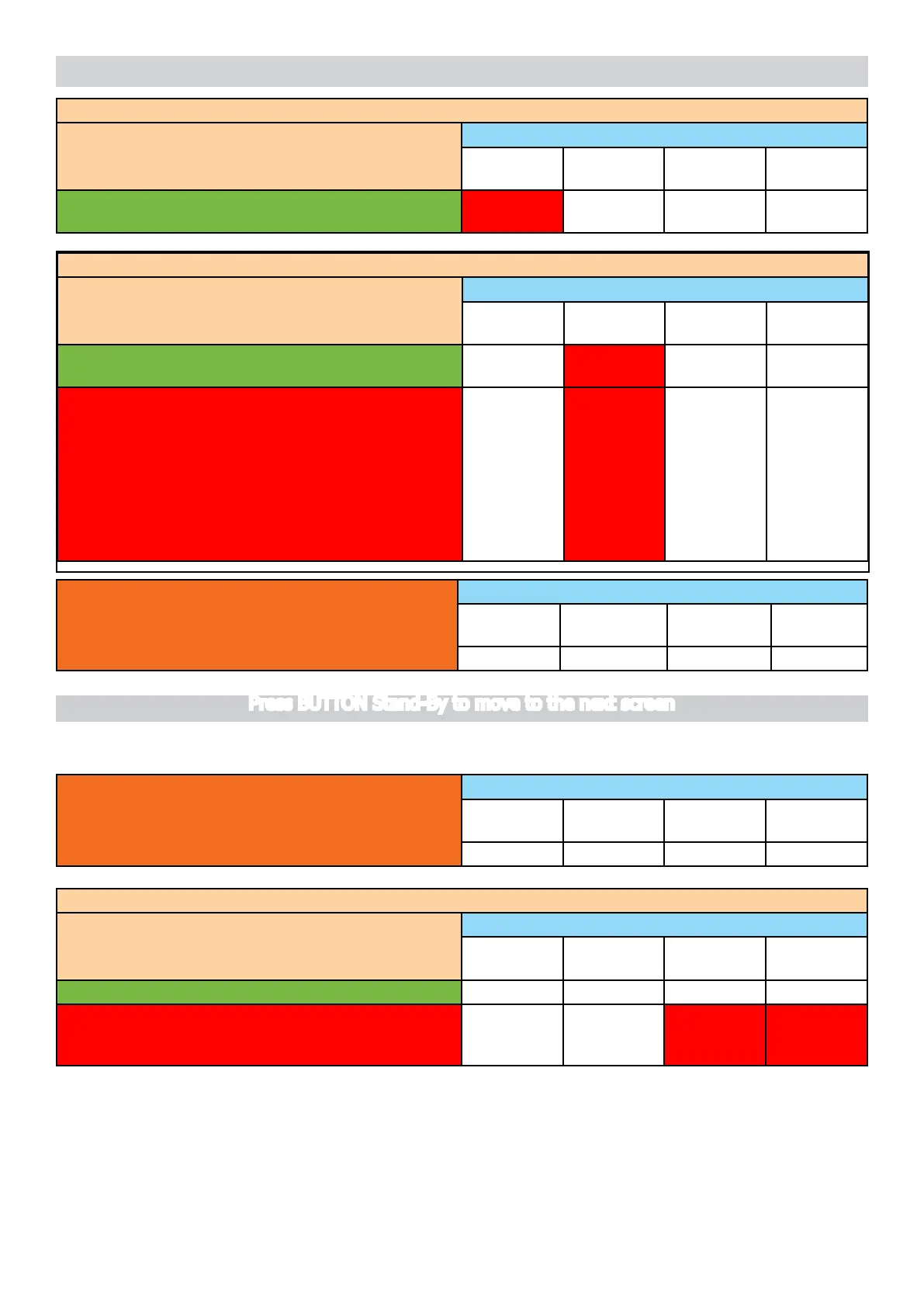
Press the Espresso button to open the EV
Action by user LED INDICATION
Led
NoBeans
Led
NoWater
Led
GenAlarm
Led Dreg
drawer full
It is possible to hear the “click” from ElectroValve. The Led
NoBeans is switched on
ON NA NA NA
Press and release the Coffee button to switch on the Pump (100 impulses)
Action by user LED INDICATION
Led
NoBeans
Led
NoWater
Led
GenAlarm
Led Dreg
drawer full
The water goes out from the dispensing spout, the
NoWater LED blink every Flowmeter pulse.
NA BLINK NA NA
ERROR:theNoWaterLEDdoes’tashing
and after 5sec this LED Switch ON; check:
1) The EV (open?)
2)Pump(isON?),
3)Theowmeter(worksrightly?)
4)thewiringfromtheowmetertothe
CPU/POWERboard(JP5)
5) the wiring from the pump to the
CPU/POWERboard(JP24)
NA ON NA NA
Finish condition:WithBU,DragDrawer,
door closed
LED INDICATION
Led
NoBeans
Led
NoWater
Led
GenAlarm
Led Dreg
drawer full
OFF OFF OFF OFF
Level 5 (Grinder-Heater)
Start condition:NOBU,NOdragdrawer,dooropen
and No Water sensor
LED INDICATION
Led
NoBeans
Led
NoWater
Led
GenAlarm
Led Dreg
drawer full
OFF OFF OFF OFF
ChecktheTemperature
Action by user LED INDICATION
Led
NoBeans
Led
NoWater
Led
GenAlarm
Led Dreg
drawer full
The red led General Alarm remains OFF NA NA OFF NA
ERROR: The temperature sensor is shorted or opened,
the led GenAlarm switch ON; check the wiring from the
heatertotheCPU/POWERboard(JP13).
NA NA ON ON
Press BUTTON Stand-By to move to the next screen








 To Next Page