21
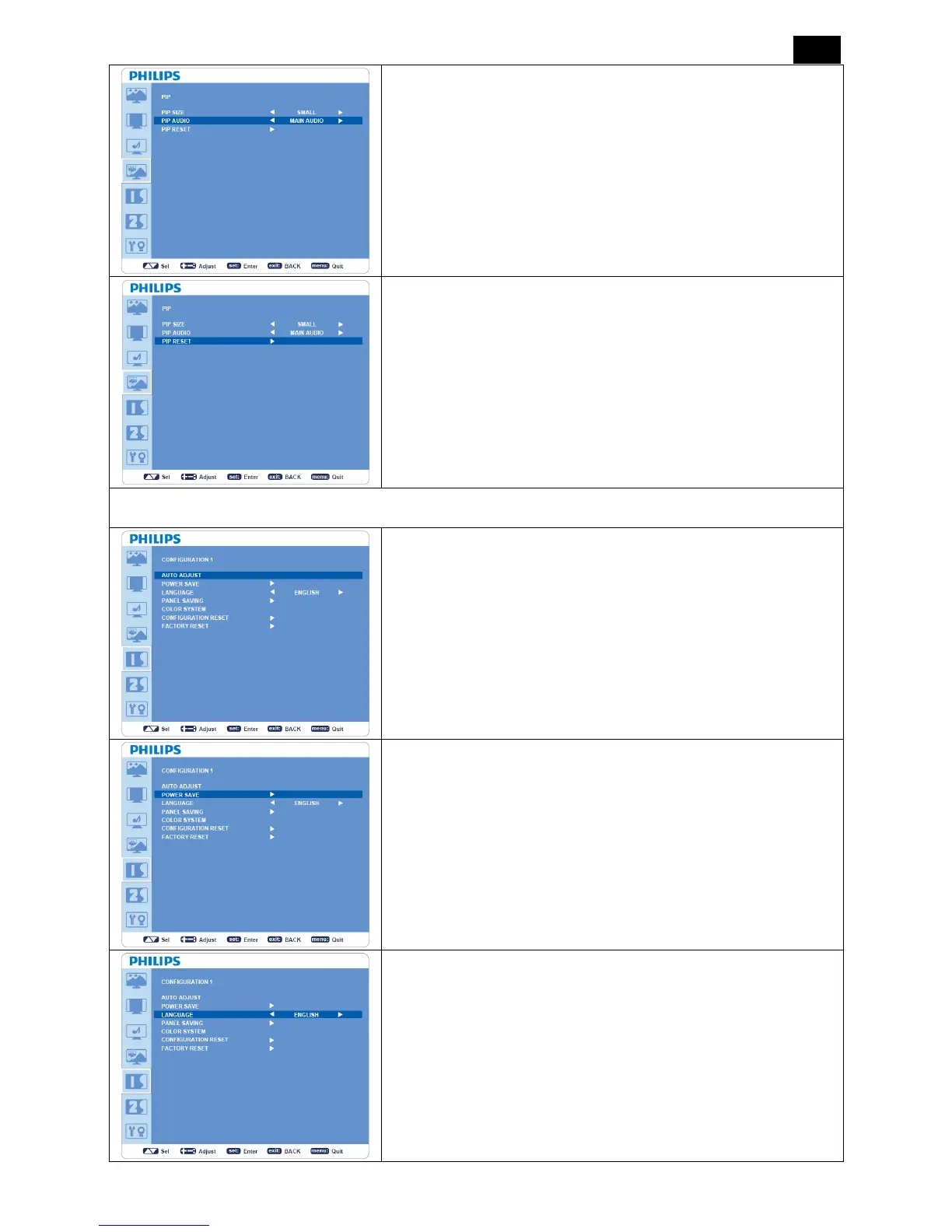
PIP AUDIO
y Selects sound source in PIP mode.
y When “MAIN AUDIO” is selected, you will get the sound in the
main picture, when “PIP AUDIO” is selected, you will get the
sound in the auxiliary picture.
PIP RESET
y Selecting PIP Reset allows you to reset all OSD settings from PIP
setting.
y Select “Yes” and press “SET” button to restore the factory preset
data.
y Press “EXIT” button to cancel and then return to the previous
menu.
CONFIGURATION 1
AUTO ADJUST
*: INPUT VGA only.
y Press “SET” button to automatically adjust screen size, horizontal
position, vertical position, clock, clock phase, white level and black
level.
y Press “EXIT” button to cancel the execution of “AUTO ADJUST”
and return to the previous menu.
POWER SAVE
y
I
f VGA “ON” is selected, the monitor will go to power management
mode when HDMI, VGA, VGA(BNC) and sync is lost.
y If VIDEO “ON” is selected, the monitor will go to power
management mode after about 10 minutes delay from the time
when COMPONENT, S-VIDEO or VIDEO input signal is lost.
LANGUAGE
OSD control menus are available in eight languages.
(English, German, French, Italian, Spanish, Polish, Turkish, Russian,
Simple Chinese)




 To Next Page