10 EN
Back panel
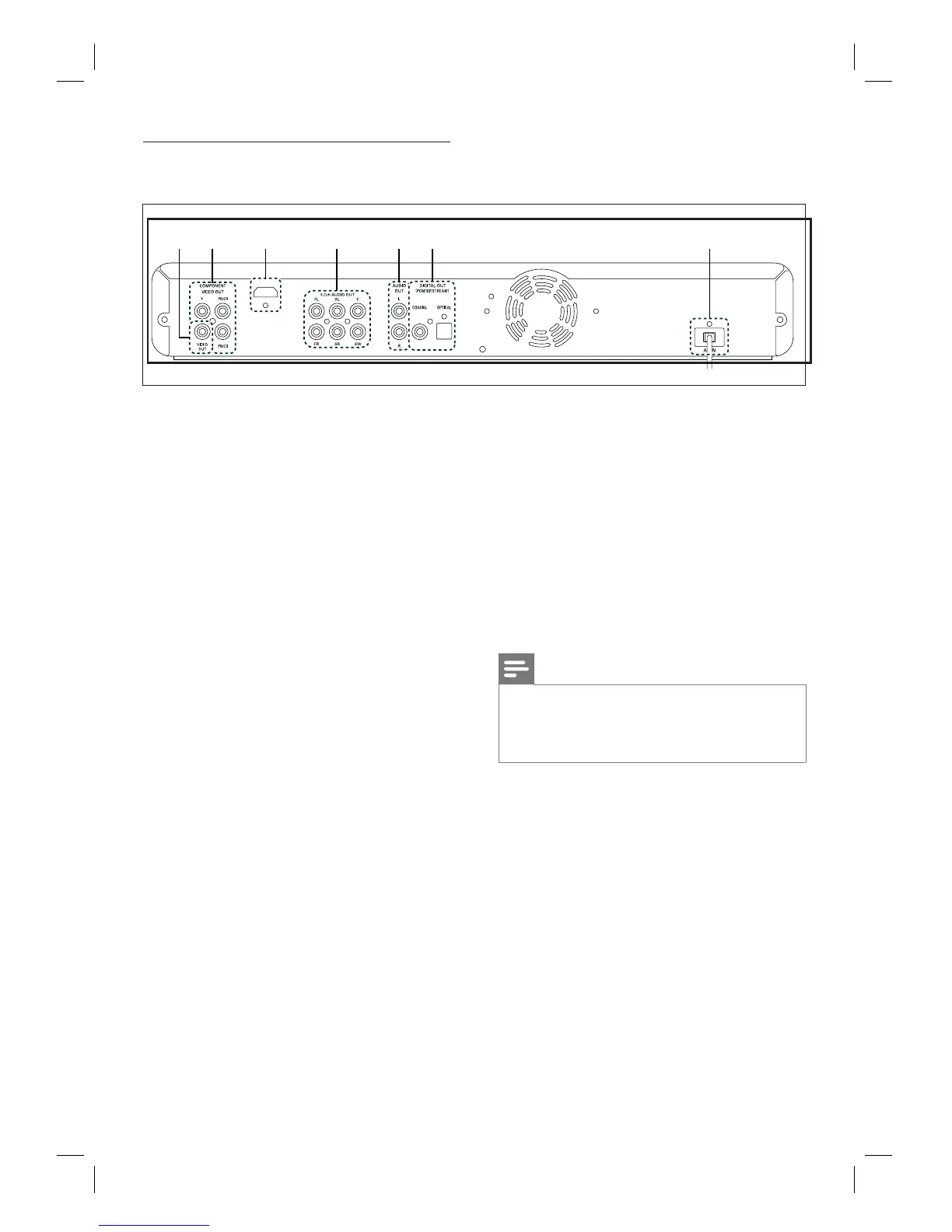
a VIDEO OUT socket
Use to connect a TV monitor, an AV
receiver/amplifi er or other device with
an RCA video cable.
b COMPONENT VIDEO OUT sockets
Use to connect a TV monitor with
component video inputs with a
component video cable.
c HDMI OUT socket
Use to connect to display with an
HDMI compatible port with an HDMI
cable.
d 5.1ch AUDIO OUT sockets
Use to connect to an AV receiver/
amplifi er with 5.1-channel audio cables.
e AUDIO OUT sockets
Use to connect a TV monitor, an AV
receiver/amplifi er or other device with
an RCA audio cable.
•
•
•
•
•
f DIGITAL OUT (COAXIAL/OPTICAL)
sockets
Use to connect an AV receiver/amplifi er,
Dolby Digital/DTS decoder or other
device with a digital audio coaxial/optical
input socket with a digital audio coaxial/
optical cable.
g AC IN Terminal
Use to connect to the AC outlet with
AC cord.
Note
Do not touch the inner pins of the sockets on
the back panel. Electrostatic discharge may cause
permanent damage to the unit.
This unit does not have the RF modulator.
•
•
•
•
HDMI OUT
bc d efa g



 To Next Page