English
EN 41
Adjust settings
Speaker Setup
Set the speaker confi guration to suite the size/
number of your speakers.
1 Press HOME.
2 Select [Settings] > [Advanced Set-up] >
[Audio] > [Analogue Audio]> [Speaker
Setup].
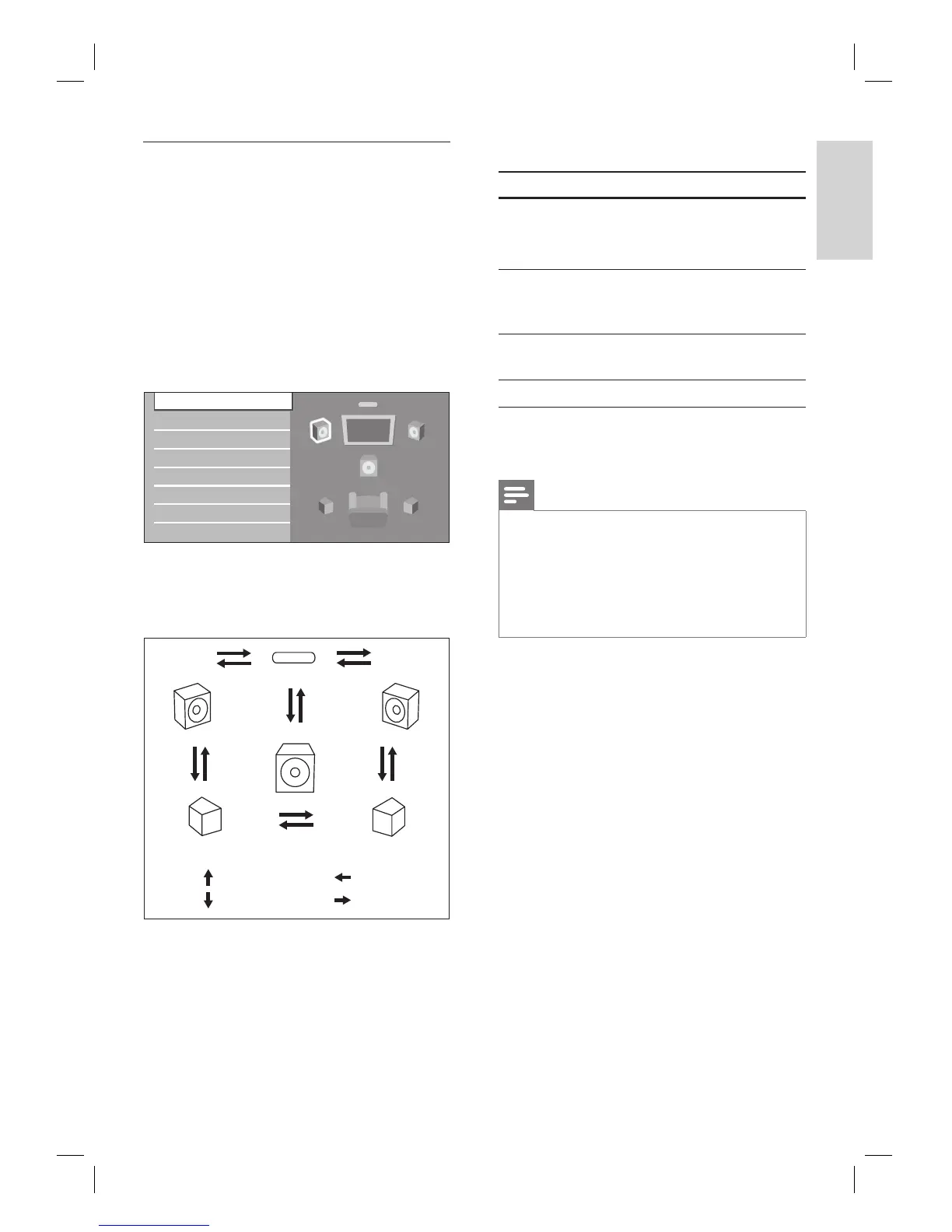
3 Highlight the speaker you want to set in
the illustration on the right.
Speaker Setup
Speaker Distance
Speaker Level
If you press Red button, each speaker
outputs the test tone for 2 seconds in
rotation. You can move among the
speakers as illustrated below:
Front (L) Front (R)
Surround (R)
Surround (L)
Subwoofer
Center
: [ ]
: [ ]
: [ ]
: []
•
4 Press OK repeatedly to change the setting.
Option Suitable for
[Large] Large speakers with the capacity
for powerful low frequency
sound.
[Small] Small speakers which do not
bare the powerful low frequency
sound. *
[On] When subwoofer speaker is
connected.
[Off] No speakers.
(*) With regards to the low frequency sound which
is less than 100Hz, the sound will be output from the
subwoofer.
Note
For subwoofer, only on/off is available. (You cannot
change the size of the subwoofer).
When the front speakers are set to [Small],
subwoofer setting remains [On] and cannot be
changed.
When subwoofer is set to [Off], the front speaker
setting remains [Large] and cannot be changed.
•
•
•
•



 To Next Page