English
EN 9
Your product
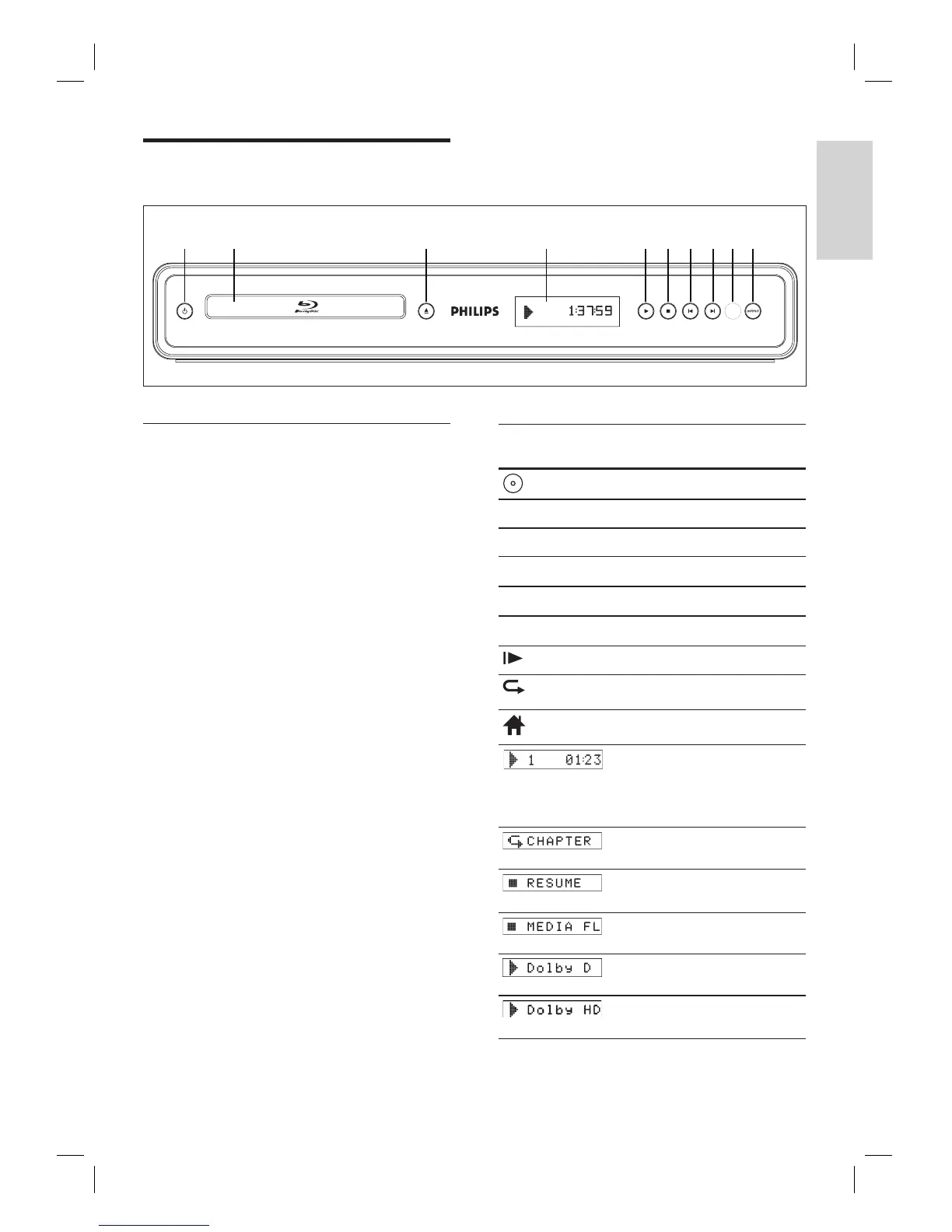
Product overview
Front panel
a 2
Press to turn the unit on and off.
b Disc tray
Place a disc when opening the disc tray.
c Z (Open/Close)
Press to open or close the disc tray.
d Front panel display
Display playback status icon and various
kinds of information. Refer to the table
next to it.
e B (Play)
Press to start or resume playback.
f x (Stop)
Press to stop playback.
g í (Previous)
Videos, music, pictures - Previous
h ë (Next)
Videos, music, pictures - Next
i Infrared sensor window
j OUTPUT
Press to change the resolution of HDMI
output. (Not available during the
playback of a BD-video or while
displaying the settings menu)
•
•
•
•
•
•
•
•
•
Front panel
display
Mode
Loading a disc.
B
Playback is in progress.
x
Stop mode.
X
Pause mode.
M
Fast forward mode.
m
Fast reverse mode.
Slow forward mode.
Repeat function is set.
Display the home menu.
Title is being played back.
Indicating the current chapter/
track/fi le number and the
elapsed playing time.
Current chapter is in chapter
repeat mode.
Playback is in Resume-On-
Stop mode.
Display the media fi lter
screen.
Dolby Digital audio is being
output.
Dolby TrueHD audio is being
output.
ab c d efg jhi



 To Next Page