36
S
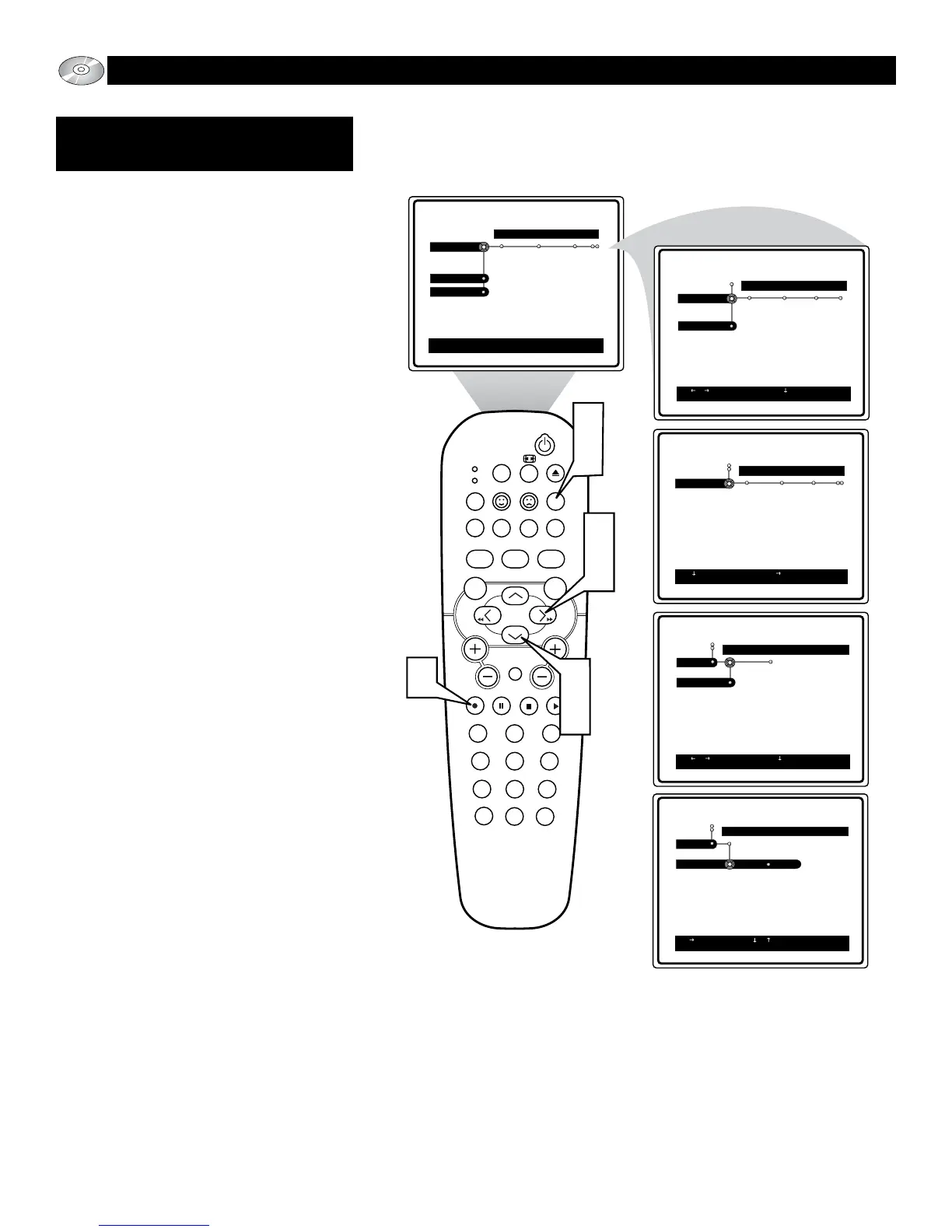
ome Video CDs contain information that
allow you to control the playback of the
disc through a special playback menu. the
PBC (Play Back Control) can be set to On or
Off.
1
Press the SYSTEM MENU (OSD)
button on the remote control to display
the on-screen menu.
2
Press the CURSOR DOWN button
until the word Setup is highlighted.
3
Press the CURSOR RIGHT button to
move the puck to the right highlighting
the word Features.
4
Press the CURSOR DOWN button to
highlight the PBC control.
5
Press the CURSOR RIGHT button
to select On or Off.
6
Press the OK button to select or acti-
vate the chosen option.
7
Press the SYSTEM MENU (OSD)
button to clear the on-screen menu
from the TV screen.
SLEEP
EJECT
SYSTEM MENU
REPEATAUDIO REPEAT A-B SUBTITLE
SMART SOUND SMART PICTURE
TV/DVD
MENU
DVD
MENU
VOL
CH
MUTE
1
23
456
789
0
CC
A/CH
OK PAUSE STOP PLAY
MODE
POWER
TV
VCR
OSD
7
1
2
4
6
5
3
Toolbar
Preferences
Setup
Welcome to DVD menu. Use navigation keys to move around
the menu.
Play Option Slide Show View
Preferences
Setup
Use or to select other options, to enter the option,
RETURN to leave the menu
Picture Sound Features
Setup
Setup
Use or to select other options, to enter the option,
RETURN to leave the menu
Language TV Audio Menu
Setup
Use or to select other options, to enter the submenu
RETURN to leave the menu.
Features Access
PBC
Setup
Use to toggle the values or to move to other options.
Features
PBC
On Off
OPERATING THE DVD P
LAYER - SETUP MENU
FEATURES:
PBC (PLAYBACK CONTROL)






 To Next Page