Welcome to DVD menu. Use navigation keys to move around
the menu.
RETURN to leave the menu.
Use and Digits to Enter Pin.
other options.
Use and Digits to Enter Pin.
Use to toggle the values or to move to other options.
OPERATING THE DVD P
LAYER - SETUP MENU
Parental Level: (Ratings 1 to 8): If you set a rating for the player, all scenes with the same rating or lower will
be played. Higher rated scenes will not be played unless an alternative is available on the disc. The alternative
must have the same rating or a lower one. If no suitable alternative is found, playback will stop and the 4-digit
code has to be entered.
Parental Level Disclaimer: This DVD player features the Parental Level system which is intended to activate
when playing DVD discs furnished with certain software coding. This is according to technical standards adopted
by the set maker and disc content industries. Please note that the Parental Level system will not operate a DVD
disc which is not furnished with the appropriate software coding. Also note that at the time of release of this
TV/DVD Player, certain aspects of the technical standards had not been settled between the set maker and the
disc industries. On this basis Philips Consumer Electronics cannot guarantee functioning of the Parental Level
system and denies any liability with unintended watching of disc content. If in doubt, please make sure the disc
plays according to your Parental Level settings before you allow children access.
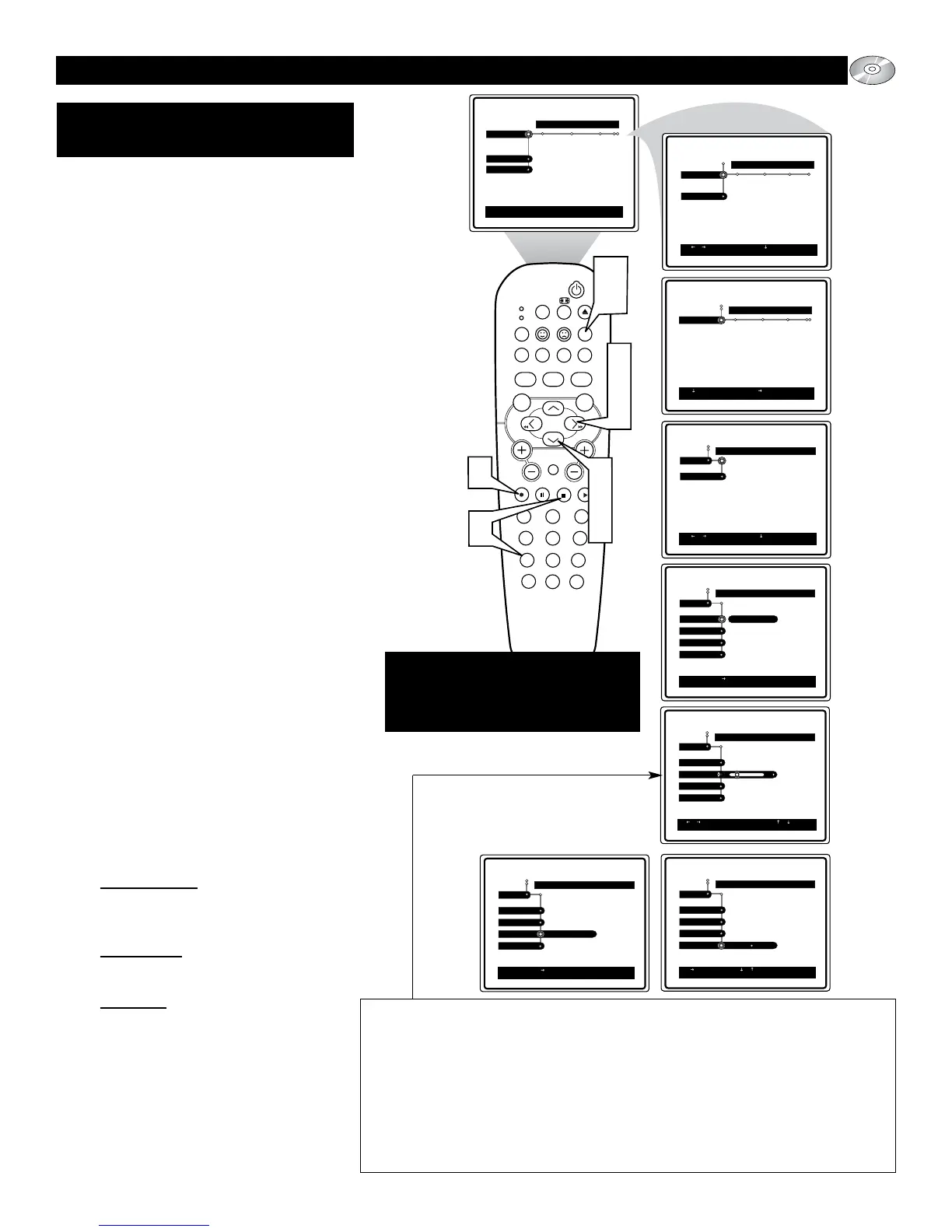
When using and making changes within the
Access Control options an access PIN will have
to entered before any new settings can be made.
Other controls include Parental Level, Change
PIN, and Disc Lock.
1
Press the SYSTEM MENU (OSD)
button on the remote control to display
the on-screen menu.
2
Press the CURSOR DOWN button
until the word Setup is highlighted.
3
Press the CURSOR RIGHT button to
move the puck to the right highlighting
the word Access.
4
Press the CURSOR DOWN button to
highlight the Enter Current PIN con-
trol.
5
Press the CURSOR RIGHT button to
gain access to the PIN entry screen.
6
If first time use, enter a 4-digit PIN
using the NUMBERED buttons. If
you have forgotten your PIN, press the
STOP button 4 times, then enter a
four digit PIN using the NUM-
BERED buttons. (You will be asked to
confirm the new number.)
7
Press the CURSOR DOWN button to
scroll the available access controls.
Choose from: Parental Level, Change
PIN, or Disc Lock.
8
Once an option is selected, press the
CURSOR RIGHT button to gain
access to the highlighted control’s
options.
Par
ental Level: Press the CURSOR
RIGHT or LEFT to select a level of
security from 0-8 (see information
below).
Change PIN
: Select this option to cre-
ate a new 4 digit PIN access number.
Follow onscreen instructions.
Disc Lock: Press the CURSOR RIGHT
to toggle the control On or Off to block
view of certain discs.
9
Press the OK button to select or acti-
vate the chosen option.
Press the SYSTEM MENU (OSD)
button to clear the on-screen menu
from the TV screen.
10
Remember if you ever forget your
Access Pin number, press the STOP
button four times to reset the control
and enter a new four digit number.
ACCESS: PARENTAL LEVEL,
C
HANGE PIN, DISC LOCK






 To Next Page