Service Modes, Error Codes, and Fault Finding
EN 19JL2.1E AA 5.
to “+12”. Change via “MENU”, “TV”, “SOUND”, “DELTA
VOLUME”.
• HDMI key validity. Indicates the key’s validity.
How to Exit CSM
Press any key on the RC-transmitter (with exception of the
“CHANNEL +/-”, “VOLUME”, “MUTE” and digit (0-9) keys).
5.3 Stepwise Start-up
The stepwise start-up method, as known from FTL/FTP sets
(EMG based sets) is not valid any more. The situation for this
chassis is as follows: when the TV is in a protection state
detected via the Stand-by Processor (and thus blinking an
error) and SDM is activated via shortcutting the pins on the
SSB, the TV starts up until it reaches the situation just before
protection. So, this is a kind of automatic stepwise start-up. In
combination with the start-up diagrams below, you can see
which supplies are present at a certain moment.
Important to know here is, that if e.g. the 3V3 detection fails
(and thus error 11 is blinking) and the TV is restarted via SDM,
the Stand-by Processor will enable the 3V3, but will not go to
protection now. The TV will stay in this situation until it is reset
(Mains/AC Power supply interrupted).
The abbreviations “SP” and “MP” in the figures stand for:
• SP: protection or error detected by the Stand-by
Processor.
• MP: protection or error detected by the VIPER Main
Processor.
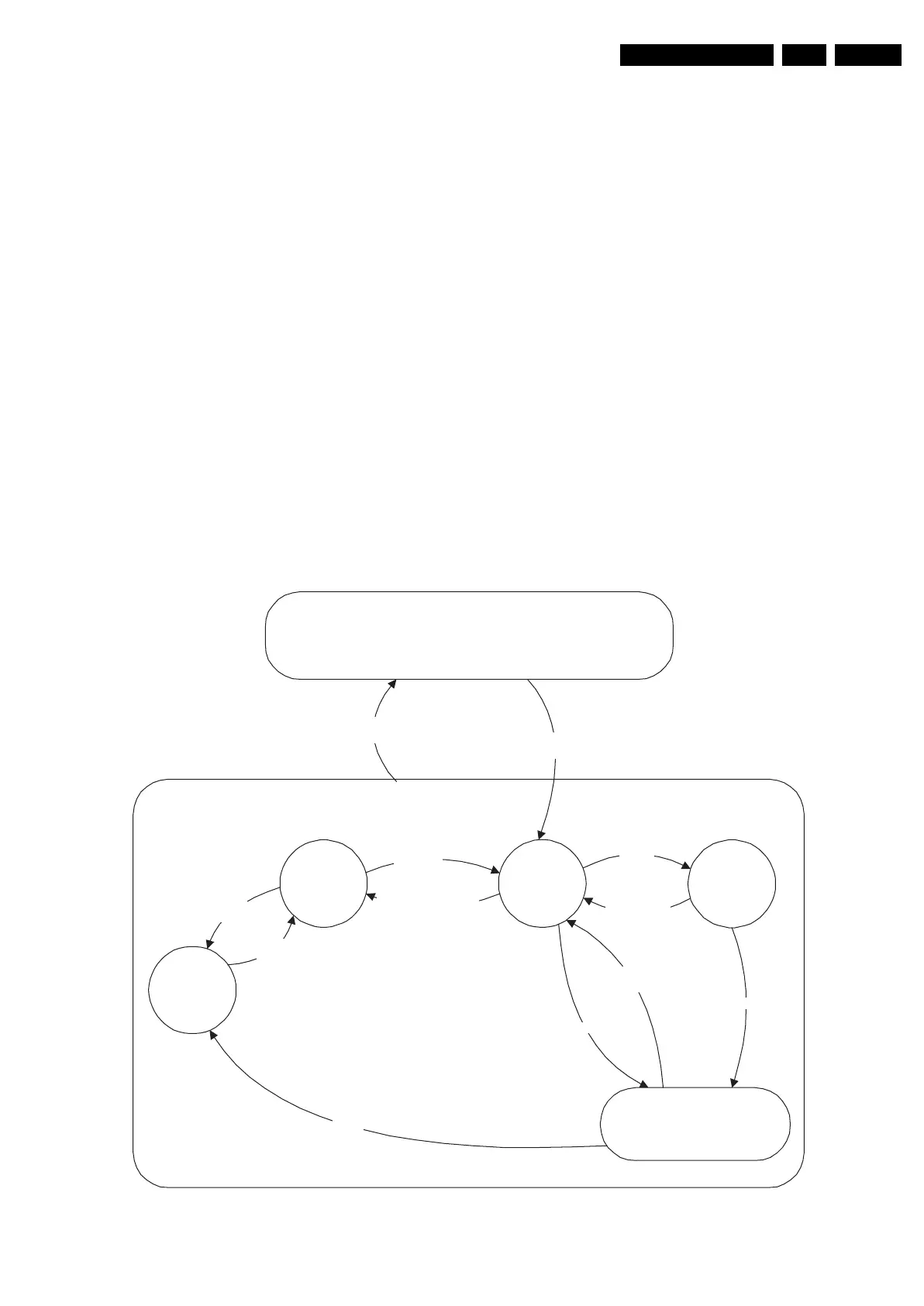
Figure 5-2 Transition diagram
On
Active
Semi
St by
St by
Off
Mains
“on”
Mains
“off”
GoToProtection
- WakeUp
requested
- Acquisition
needed
- No data Acquisition
required
- Tact SW pushed
- St by
requested
- Tact SW
pushed
WakeUp
requested
Protection
WakeUp
requested
GoToProtection
St by
'Off'
Tact SW
pushed
Tact SW
pushed
Tact SW
pushed
F_15710_151.eps
200905










 To Next Page