PAGE 9-171097626, VER. 03
3. Allow the device to continue running the automated “Learn Pressure Bal” test. This portion of the
test will take approximately 80 minutes. The unit will shut down when this portion of the test is
complete.
4. Record the four O
2
purities displayed on the Real Time screen onto the Test Data Sheet prior to
turning the device back on.
5. Verify the O2 factors shown on the Usage Data tab are all below 1.25 and record on Test Data Sheet.
6. Turn the device back on.
7. The data recovery tool should now detect the device and begin downloading the data.
8. If any of the O2 Factors exceed 1.25, troubleshoot and repair the device. Once resolved, reset the O2
Factors via the Reset O2 factors button on the Usage Data tab of the data recovery tool and repeat the
Balancing Procedure.
9. Verify the functionality of the control panel buttons. Then turn the device off and listen for three
audible tones signifying the device turning off. Record results on the test data sheets.
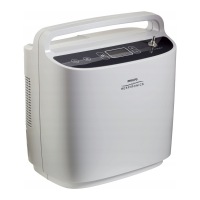
10. Ensure loss of power alarm is installed in SimplyFlo’s dataport
11. Power the device ON. Allow the device to operate for 1 minute.
12. Unplug the power supply from the running SimplyFlo.
13. Verify that the loss of power alarm is clearly audible. Record the results on the test data sheet.
14. Tilt SimplyFlo 90 degrees left or right. Verify that the alarm silences. Record the results on the test
data sheet.
15. Re-connect the device to the power supply. It should power ON.
16. Allow the device to run at least 10 seconds.
17. Power the device OFF by pressing the POWER button twice.
18. Unplug the power supply. Verify the alarm does not sound. Record the results on the test data
sheet.
19. If the SimplyFlo fails testing, turn the unit completely off and retest the unit.
20. If the unit fails a second time refer to the trouble shooting section of the Service Manual.


 To Next Page
 Loading...