66 EN EN 67
6.2 Play Speed
When playing, shortly press“ ”to enter play speed mode,
increase the play speed by one level by each press until it
reaches to the maximum play speed and then returns to the
initial level.
Reminders:
The values for variable speed include: 1, 2, 3,4, -4, -3, -2, -1
and 0.
When the value is set at 0, there will be no change to the
playing speed;
When the value is set at 1-4, the playing speed will be
become faster;
When the value is set at -4 to -1, the playing speed will
become slower.
6.3 Replay Mode
When playing, shortly press “”to pop up AB replay times
setting interface, select AB replay times; shortly press “”to
enter the start point A of AB replay; press “”again to set end
point B of AB reply; after replay is completed, the playing of
the audio file will be resumed.
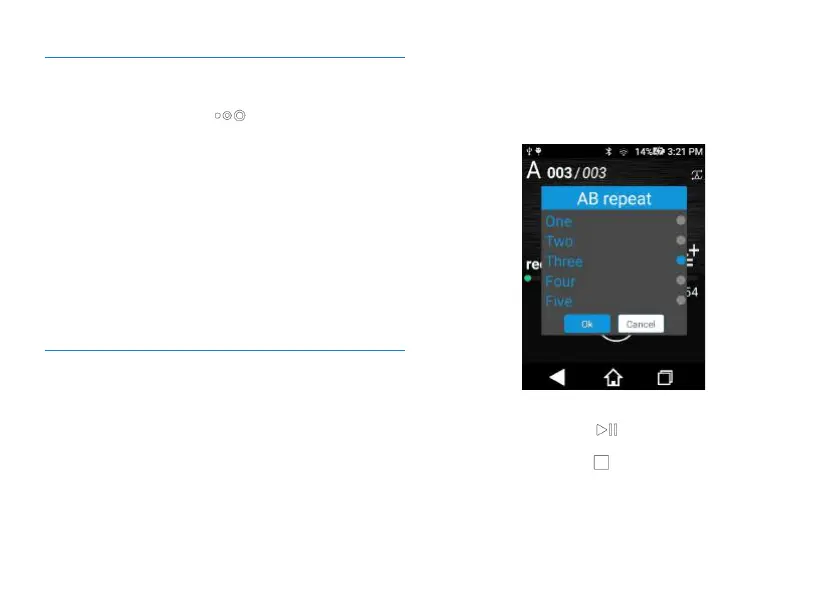
About Setting of AB Replaying Times
1. When the recorded audio is being played, short press “”
to let a dialogue box pop up and then click AB Number of
Replay Times. Enter the setting interface on AB Replaying
Times and select the number of replaying times as required,
which can be set at 1, 2, 3, 4 or 5.
The reference setting page is shown below:
Reminders:
1. During AB replay, press “ ” to suspend playing and then
AB Replaying mode ends.
2. During AB replay, press“ ” to stop playing and then AB
Replaying mode ends.
3. During AB replay, press“+” or “-“ to adjust the volume and
AB Replaying mode does not end.














 To Next Page