78 EN EN 79
10. Network Setting
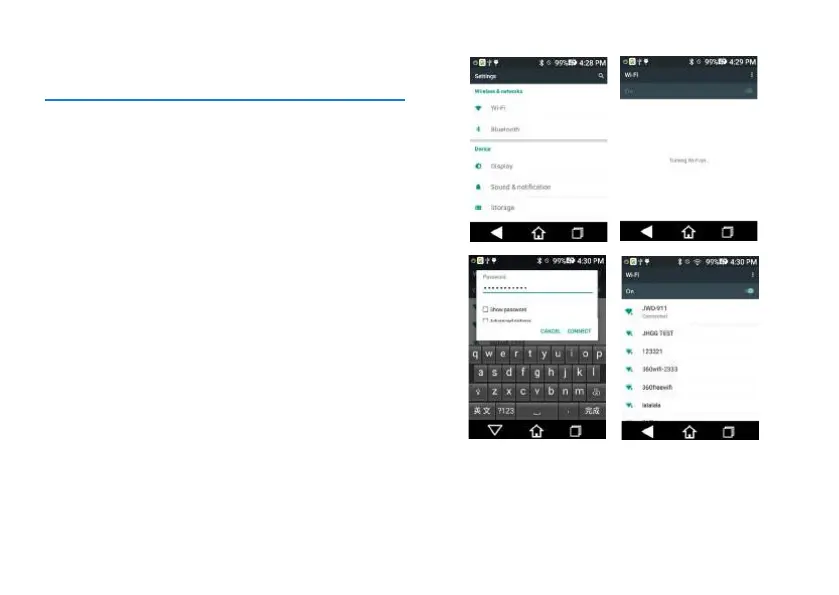
There are two approaches for network setting:
#1 Approach:
1. Short press “WIFI Quick Key” when device is turned on
and enter into the “WIFI” selection interface.
2. Choose the name of WIFI you want.
3. Enter the password for such WIFI connection.
4. Click “Connect” to connect with WIFI.
Reminder:
When choosing this approach to enable WIFI function, there
is no need to push the “Open” icon for WiFi setting to the
right side. WIFI function is directly enabled.
#2 Approach:
1. Click the “Professional Tools” on the main menu.
2. Click “Setting” and enter the device setting interface.
3. Click “WLAN” to enter into the “WIFI” selection page.
4. Push the “Open” icon of WIFI setting to the right and
open WIFI device.
5. Select the WIFI you want.
6. Enter the password for such WIFI connection.
7. Click “Connect” to connect with WIFI.
The interface for network setting is shown below:














 To Next Page