EasyManua.ls Logo

Physio Control LIFEPAK 9 - Battery Pack Removal; Front Panel Bezel and Keypad Assembly Removal

Physio Control LIFEPAK 9
214 pages
Print Icon
To Next Page IconTo Next Page
To Previous Page IconTo Previous Page
Loading...
Battery
Pack
Removal
Front
Panel
Bezel
and
Keypad
Assembly
Removal
1.
Service
and
Maintenance
4
Open
and
remove
the
battery
door
(13)
at
the
bottom
of
the
instrument.
Note:
When
installing
a
replacement
Battery
Pack,
be
sure
to
charge
the
Battery
Pack
for
24
hours.
Refer
to
Battery
Maintenance
on
page
4-1.
|
.
Remove
the
Battery
Pack
(A13).
Free
the
Battery
Pack
by
pressing
the
locking
tab
on
the
battery
harness
and
separating
the
two
connectors.
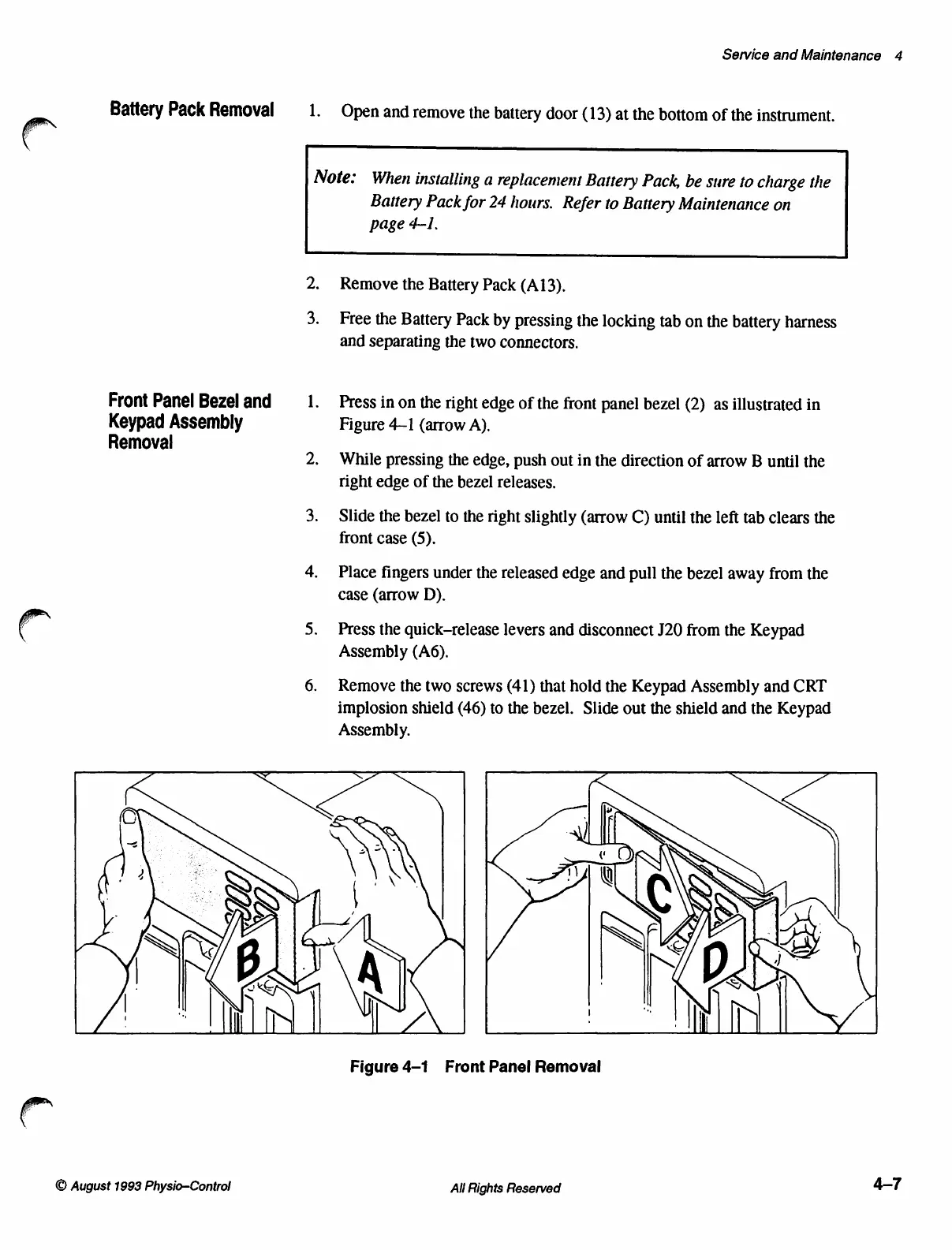
Press
in
on
the
right
edge
of
the
front
panel
bezel
(2)
as
illustrated
in
Figure
4-1
(arrow
A).
While
pressing
the
edge,
push
out
in
the
direction
of
arrow
B
until
the
right
edge
of
the
bezel
releases.
Slide
the
bezel
to
the
right
slightly
(arrow
C)
until
the
left
tab
clears
the
front
case
(5).
Place
fingers
under
the
released
edge
and
pull
the
bezel
away
from
the
case
(arrow
D).
Press
the
quick-release
levers
and
disconnect
J20
from
the
Keypad
Assembly
(A6).
Remove
the
two
screws
(41)
that
hold
the
Keypad
Assembly
and
CRT
implosion
shield
(46)
to
the
bezel.
Slide
out
the
shield
and
the
Keypad
Assembly.
©
August
1993
Physio-Control
Figure
4-1
Front
Panel
Removal
All
Rights
Reserved
4-7

Table of Contents

Other manuals for Physio Control LIFEPAK 9

Related product manuals