EasyManua.ls Logo

Physio Control LIFEPAK 9 - Page 86

Physio Control LIFEPAK 9
214 pages
Print Icon
To Next Page IconTo Next Page
To Previous Page IconTo Previous Page
Loading...
Testing
3
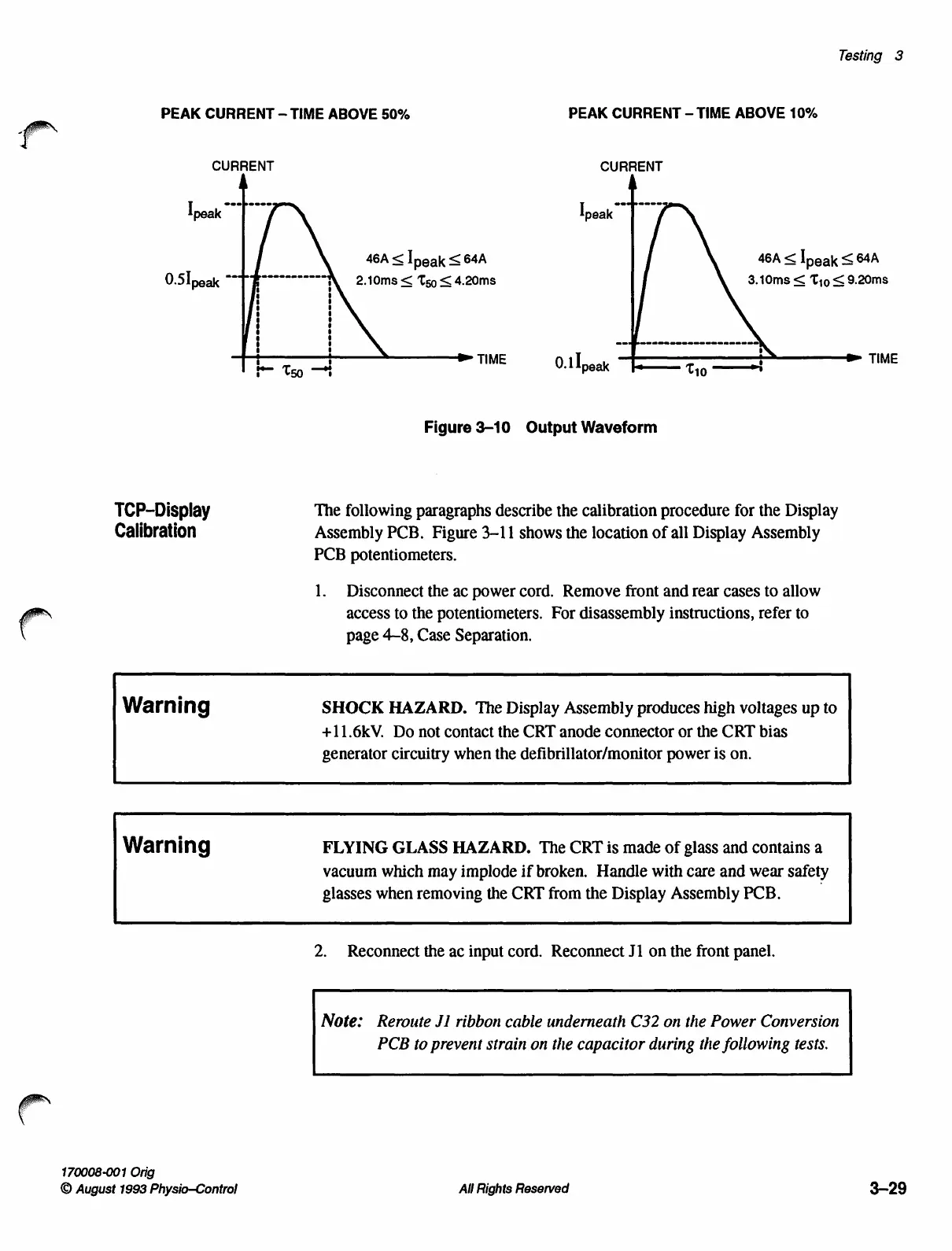
PEAK
CURRENT
-
TIME
ABOVE
50%
PEAK
CURRENT
-
TIME
ABOVE
10%
CURRENT
CURRENT
Ipeak
46A
<
Ineak
<64A
46А
<
[реак
<
64А
2.10ms
<
T59
<
4.20ms
3.10ms
<
Tio
<
9.20ms
—>
TIME
TIME
Tso
---δ
0.1
peak
ーーーーーー
Tio
o!
==
Figure
3-10
Output
Waveform
TCP-Display
The
following
paragraphs
describe
the
calibration
procedure
for
the
Display
Calibration
Assembly
PCB.
Figure
3-11
shows
the
location
of
all
Display
Assembly
PCB
potentiometers.
1.
Disconnect
the
ac
power
cord.
Remove
front
and
rear
cases
to
allow
access
to
the
potentiometers.
For
disassembly
instructions,
refer
to
page
4-8,
Case
Separation.
Warning
SHOCK
HAZARD.
The
Display
Assembly
produces
high
voltages
up
to
+11.6kV.
Do
not
contact
the
CRT
anode
connector
or
the
CRT
bias
generator
circuitry
when
the
defibrillator/monitor
power
is
on.
Warning
FLYING
GLASS
HAZARD.
The
CRT
is
made
of
glass
and
contains
a
vacuum
which
may
implode
if
broken.
Handle
with
care
and
wear
safety
glasses
when
removing
the
CRT
from
the
Display
Assembly
PCB.
2.
Reconnect
the
ac
input
cord.
Reconnect
J1
on
the
front
panel.
Note:
Reroute
Ji
ribbon
cable
underneath
C32
on
the
Power
Conversion
PCB
to
prevent
strain
on
the
capacitor
during
the
following
tests.
170008-001
Orig
©
August
1993
Physio—Control
All
Rights
Reserved
3-29

Table of Contents

Other manuals for Physio Control LIFEPAK 9

Related product manuals