DISCONNECTING THE BATTERY CABLES WILL RESULT
IN A RESET OF THE CLOCK
Multimedia System PMP-PIAGGIO MIA
Download and install the specific «PIAGGIO» app
from the Play Store or Apple Store on your smart-
phone.
The procedure for pairing the smartphone - PMP -
PIAGGIO MIA Multimedia system and the entire
multimedia content will be managed with the CON-
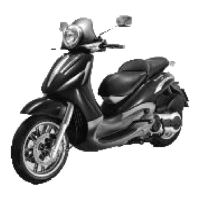
NECTIVITY button on the handlebar.
PAIRING PROCEDURE Smartphone - Multime-
dia System PMP-PIAGGIO MIA
The vehicle is equipped with the "Piaggio MIA"
control unit that communicates with the smart-
phone via Bluetooth. Using the specific "Piaggio"
application that can be installed on the smart-
phone, it is possible to exchange data with the
vehicle and manage multimedia content.
Once the connection is established correctly be-
tween the control unit and the smartphone, the
following functions can be directly managed on the
digital display of the vehicle:
•
manage phone calls;
•
manage audio playback;
•
SMS notifications management.
To enable the functions of the multimedia system,
it is necessary to pair the device on the vehicle with
the smartphone performing the following proce-
dure:
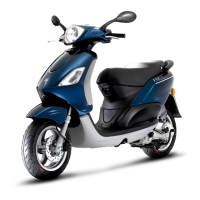
- With the starter switch in "OFF" position,
keep the CONNECTIVITY button on the right
side of the handlebar pressed;
- Turn the starter switch to "ON" while continu-
ing to keep the CONNECTIVITY button on the
Beverly 400 E5 Electrical system
ELE SYS - 75



 To Next Page