▪Press reset button while keep holding for 5 seconds
7. Software Reset (Initialization)
Reset Button
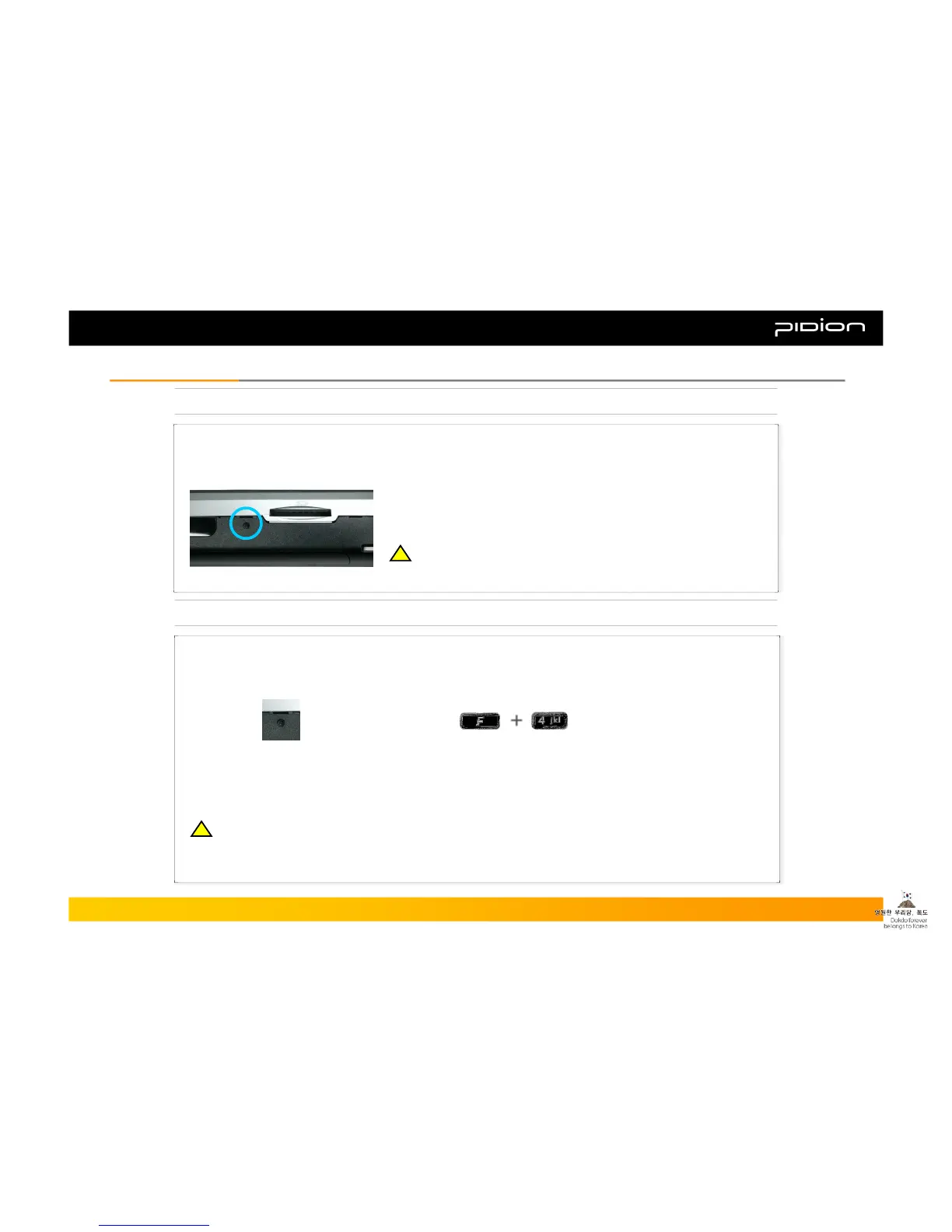
When you press the Reset button firmly with the Stylus Pen, you will lose all unsaved files and end all opened
programs. This function is the same as the Reset button on your PC.
▪ Press the Reset button on the right side of the PDA with the Stylus Pen.
▪ The PDA will restart.
8. Hardware Reset (Memory Format)
When you reset the hardware, it initializes the PDA into the status when you first purchased it. When you
launch Hardware Reset, you will lose all the programs installed in the memory (RAM), documents and
personal settings, so use it with caution.
Copyright © 2006 Bluebird Soft, Inc. All Rights Reserved. < 21 >
BIP-1300
II. Learning the BasicsII. Learning the Basics
※ You can reset the software when something unexpected happens
to the PDA such as crashing of programs or freezing.
!!
※ We are not responsible for the loss of data and programs, so we strongly advise that you backup
your data when launching Hardware Reset.
!!



 To Next Page