User Manual of WAP-200N/WBS-200N
-17-
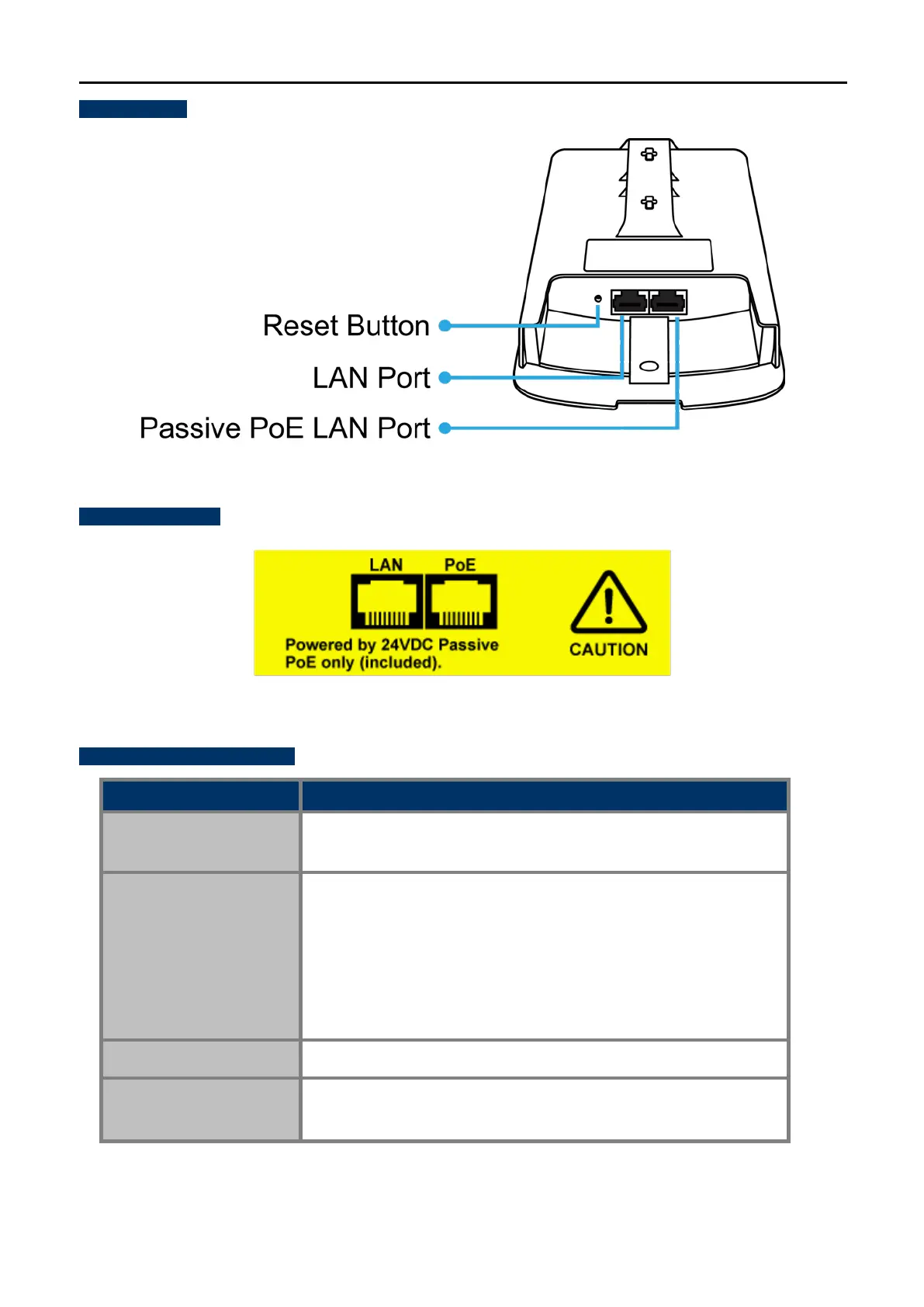
Bottom Panel
Figure 2-5 Bottom Panel (WAP-200N/WBS-200N)
PoE Warning Label
Figure 2-6 PoE Warning Label
Hardware Interface Definition
Object Description
Antenna Connectors
(WAP-200N only)
2 RP-SMA (Female) antenna connectors
Passive PoE LAN Port
10/100Mbps RJ45 port, auto MDI/MDI-X
Passive PoE/PD supported, 24V DC In
Pin assignment:
Pins 4, 5 (+)
Pins 7, 8 (-)
NOTE: Please use the 24V DC Passive PoE only (included)
LAN Port
10/100Mbps RJ45 port, auto MDI/MDI-X
Reset Button
Press and hold the Reset button on the device for over 10 seconds
to return to the factory default setting.
Table 2-2 Hardware Interface Definition



 To Next Page