User Manual of WAP-200N/WBS-200N
-92-
5.6.8 Wi-Fi Schedule
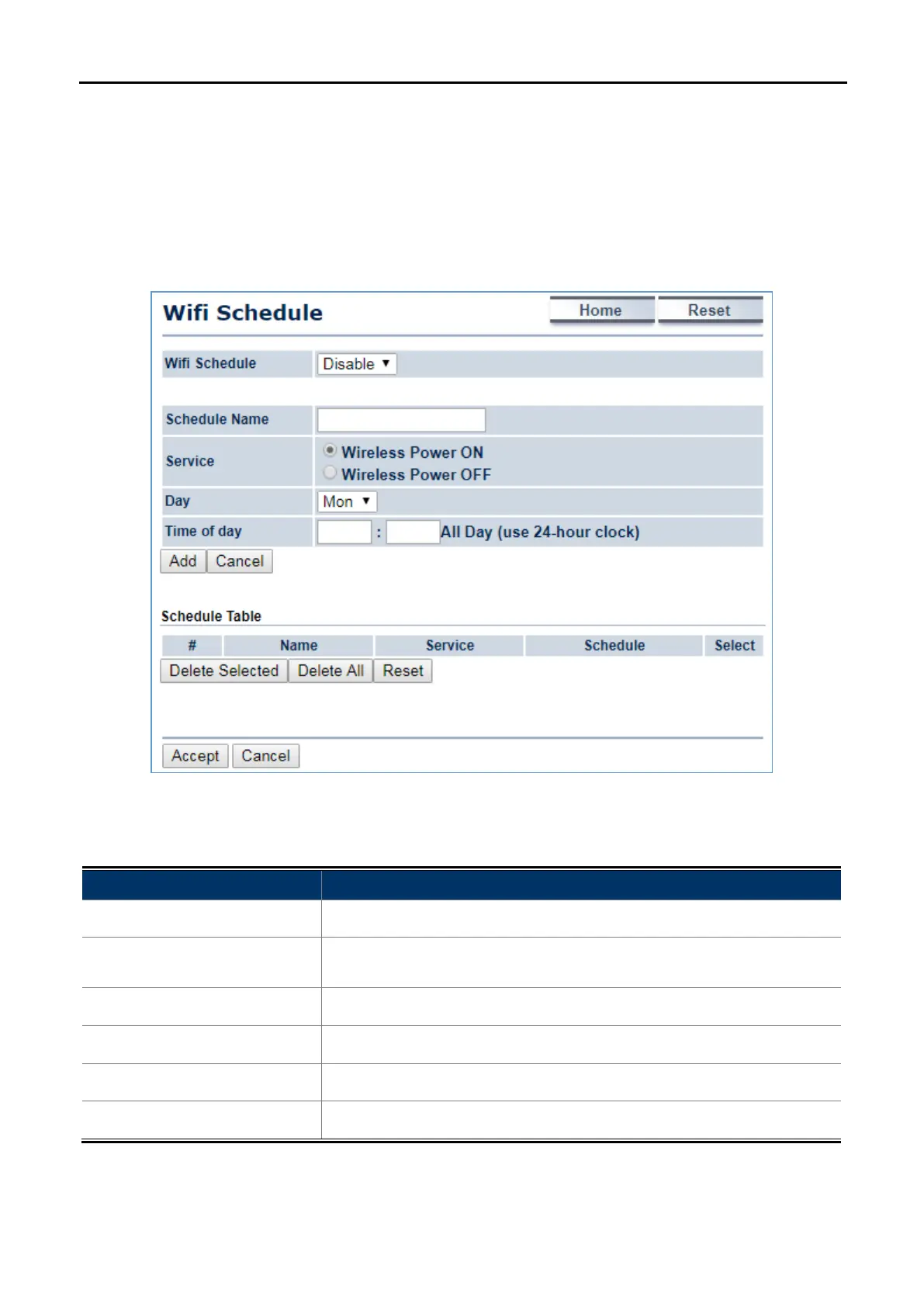
This page allows you to configure wireless schedule. The device can regularly enable/disable Wi-Fi function
according to the pre-defined schedule rules.
Click “Management Auto Reboot Settings” and the following page will be displayed.
Figure 5-55 Wi-Fi Schedule
The page includes the following settings:
Object Description
• Schedule Name
Enter the description of the schedule service.
• Service
Select the type of schedule service, either Wireless Power ON or
Wireless Power OFF.
• Day
Select the days of the week to enable the schedule service.
• Time of Day
Set the start time that the service is active.
• Add
Click Add to append the schedule service to the schedule service table
• Cancel
Click Cancel to discard changes.



 To Next Page