User Manual of WAP-200N/WBS-200N
-77-
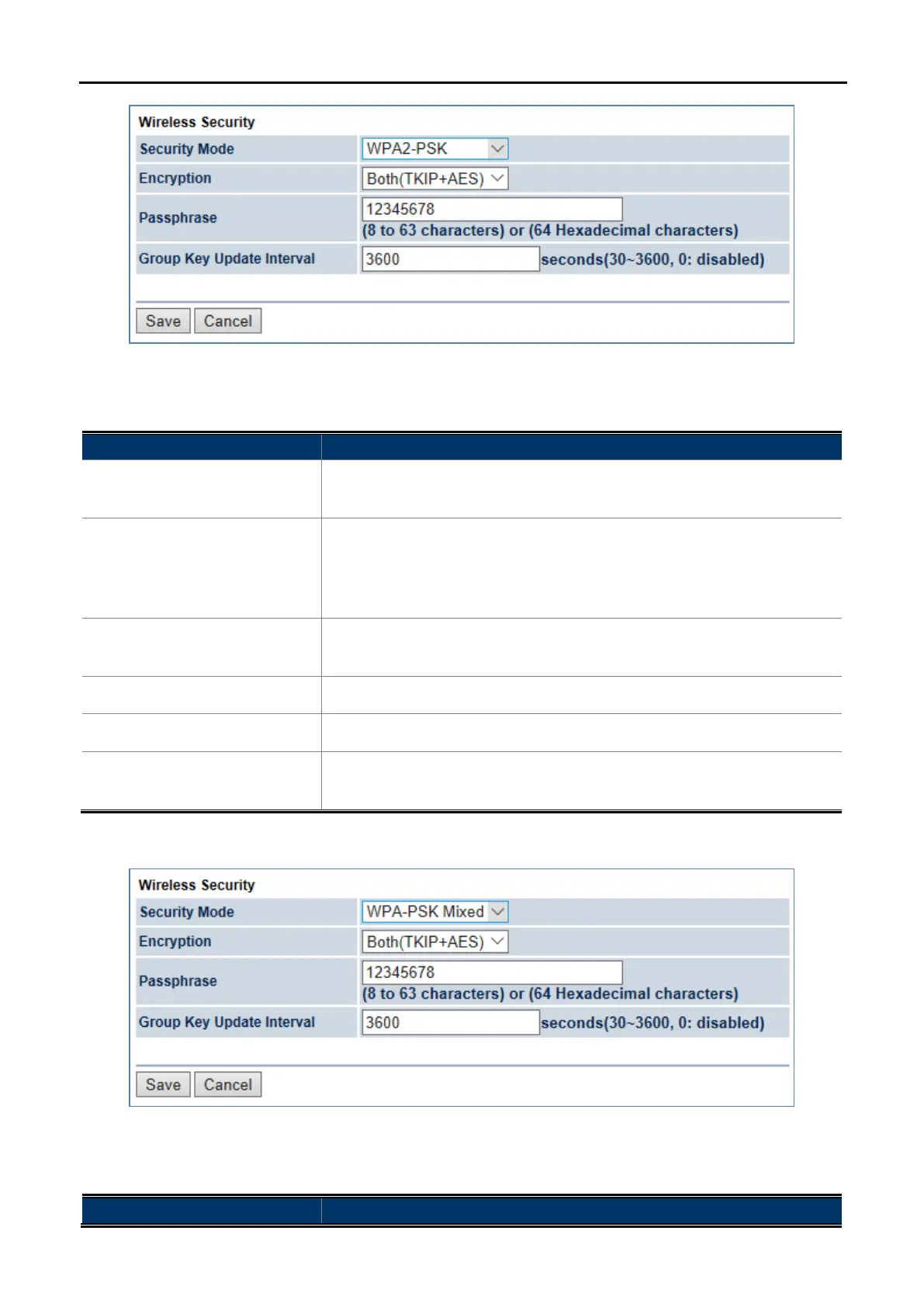
Figure 5-41 Security Settings – WPA2-PSK
The security mode includes the following settings:
Object Description
• Security Mode
Select WPA2-PSK from the drop-
down list to configure the wireless
network using WPA2-PSK encryption method.
• Encryption
Select Both, TKIP, or AES as the encryption type.
Both: uses TKIP and AES.
TKIP: automatic encryption with WPA-PSK; requires passphrase.
AES: automatic encryption with WPA2-PSK; requires passphrase.
• Passphrase
Specify the security password. For security, each typed character is
masked by a dot.
• Group Key Update Interval
Specify how often, in seconds, the group key changes.
• Save
Click Save to save the settings.
• Cancel
Click Cancel to cancel the unsaved changes and revert to the previous
settings.
WPA-PSK Mixed
Figure 5-42 Security Settings – WPA-PSK Mixed
The security mode includes the following settings:
Object Description



 To Next Page