EasyManua.ls Logo

Point Mobile PM75 - PM75 Notification Panel Usage

Point Mobile PM75
85 pages
Print Icon
To Next Page IconTo Next Page
To Previous Page IconTo Previous Page
Loading...
PM75 Android 11 User Manual
Learning the Basics
28
© 2021 Point Mobile Co., Ltd. All rights reserved
Status bar
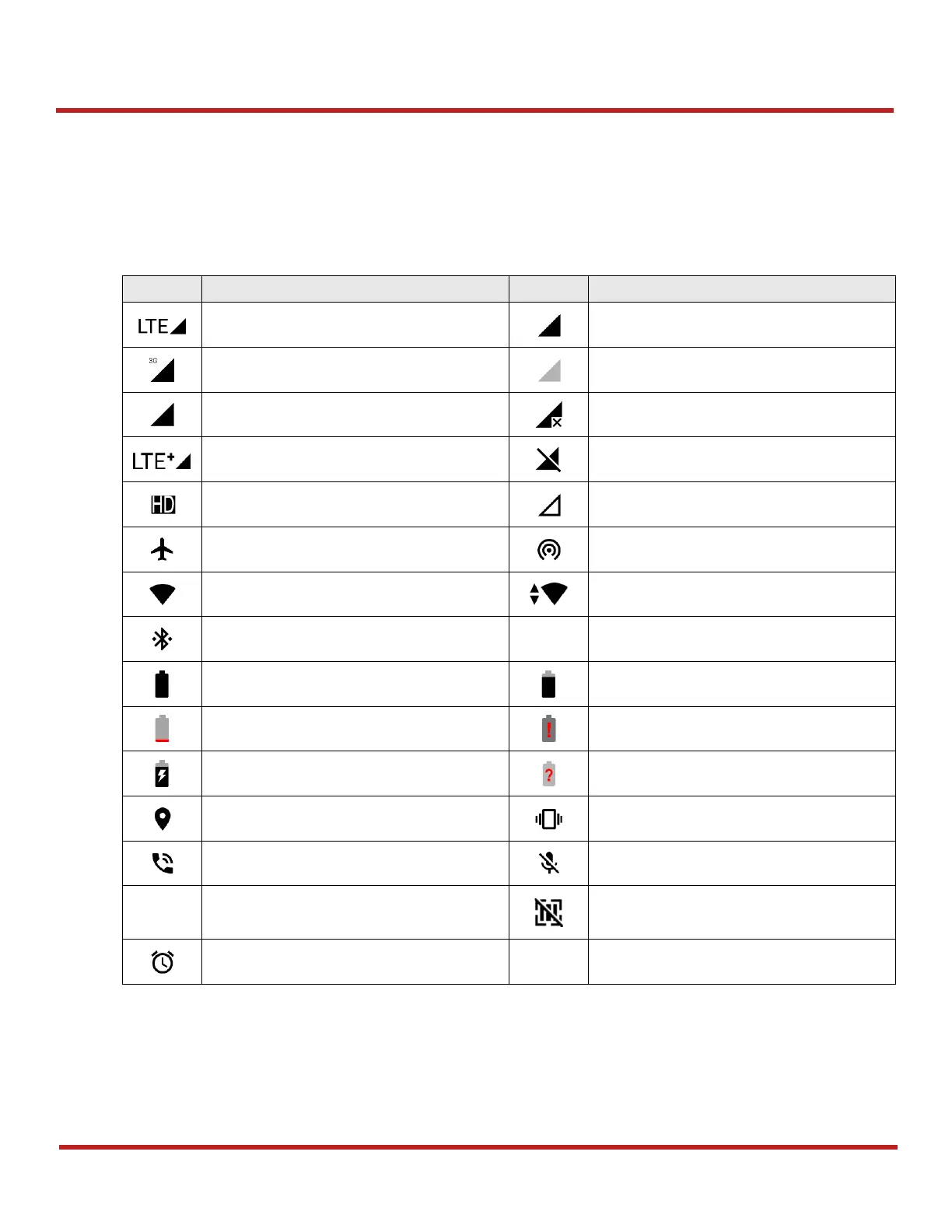
Time, status icons, and notification icons are on the Status bar.
Status icons
Icon
Description
Icon
Description
LTE connected
Strong signal
3G connected
Weak signal
EDGE connected
Connection issue
LTE+ (LTE CA) connected
Data disabled
VoLTE enabled
No data connection
Airplane mode
Hotspot enabled
Connected to a Wi-Fi network
Wi-Fi data communication
Connected to a Bluetooth device
Battery is full
Battery is partially drained
Battery is low
Battery is critical low
Battery is charging
Cannot recognize battery
Location service turned on
Vibrate mode
Speakerphone turned on
Phone mic is mute
Scanner turned on
Scanner turned on,
but trigger turned off
Alarm is set

Table of Contents

Other manuals for Point Mobile PM75

Related product manuals