Need help?
Do you have a question about the PowerBox Systems MERCURY SR2 and is the answer not in the manual?
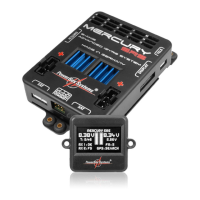
Details on physically installing the PowerBox Mercury SR2 unit, switch, and screen in the model.
Instructions for connecting one or two receivers, emphasizing spacing and supported RC systems.
Guidance on connecting various battery types (LiPo, LiFePo, NiMH) and the importance of correct polarity.
Accesses iGyro settings for fine-tuning, requiring an iGyro SAT sensor unit.
Adjusts mechanically interconnected servos using a five-point curve and the Auto Matching function.
Configuration options for the door sequencer, manual setup, or using the Setup Assistant.
Assigns all 16 outputs to transmitter channels, gyro, or sequencer functions without limitations.
Assigns transmitter channels to control iGyro or sequencer functions, allowing flexible control.
Modifies fundamental settings such as language, frame rate, and basic system parameters.
Guides through initial setup, determining transmitter inputs, model type, and servo assignments.
Allows resetting individual ranges and activating the data port for PC updates via USB.
Sets the output voltage to 6.0V or 7.8V, recommended for HV servos for consistent performance.
Configures servo signal frame rate (16ms default, 12ms for digital servos) for optimal performance.
Specifies the battery type to ensure accurate graphical display and unit performance matching.
Configures the capacity counter for consumed capacity display (count-up or count-down).
Chooses the desired menu language from available options, typically German or English.
Selects wing type (Normal/Delta) and tail type (Normal, Tailerons, V-tail) for the model.
Assigns servos to control surfaces and learns transmitter stick inputs for each function.
Teaches the iGyro SAT its physical orientation within the model for accurate gyro response.
Calibrates transmitter stick end-points and center points for iGyro functions.
Initializes servo positions and allows for reversing output direction efficiently.
Manually adjusts servo travel points for precise alignment of mechanically linked servos.
Automatically matches up to three mechanically linked servos using current measurement for accurate travel.
Step-by-step guide to performing auto matching, selecting servos, and initiating the process.
Configures switch channel, gear up output, and function selection for sequencer operations.
Guides through setting up retractable undercarriage sequences, learning door positions, and modes.
Sets the number of wheel doors and pause times between undercarriage and door movements.
Assigns retract control units and wheel doors to specific outputs on the PowerBox Mercury SR2.
Manually sets travel points and timing for each function within the door sequencer.
Defines function types (Direct, Gyro, Sequencer) and configures Failsafe response for each output.
Adjusts iGyro behavior, stick priority, lock feel, and airspeed factor for precise tuning.
Learns iGyro SAT orientation and calibrates transmitter stick endpoints for accurate gyro control.
Guides through the first flight for initial gyro setup, finding optimum gain, and setting flight modes.
 General
| Model | MERCURY SR2 |
|---|---|
| Category | Power Supply |
| Dimensions | 54 x 31 x 13 mm |
| Weight | 29g |
| Current Load Peak | 30A |
| Supported Telemetry Systems | Jeti, Futaba, Spektrum |

 To Next Page