Installation Setup
10
Powerware
®
9170
+
UPS User’s Guide S Rev B www.powerware.com
Caster Cart Installation
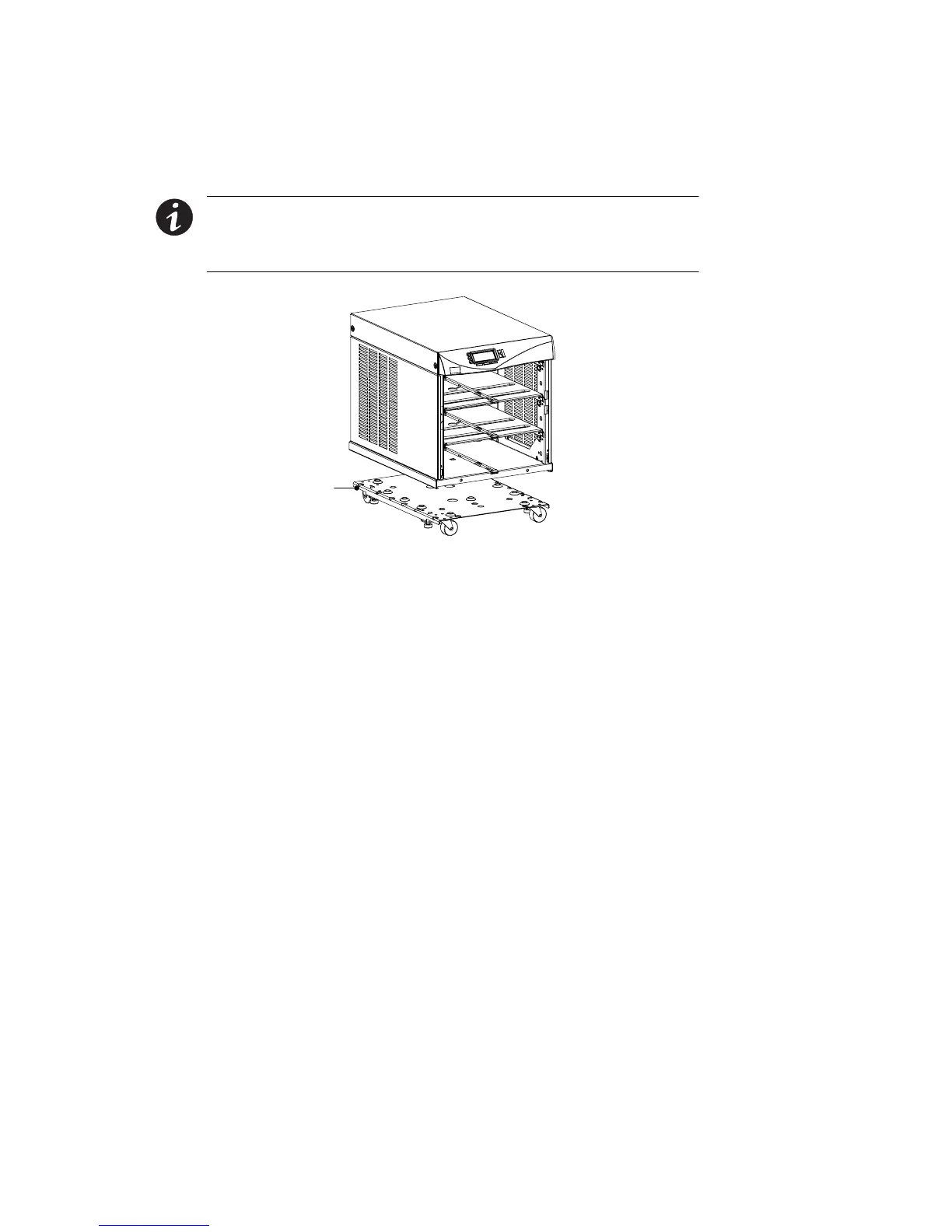
An op tional caster cart (ASY-0527) is available for 3- and 6-slot cabinets
for increased mobility of the UPS (see Figure 7).
NOTE TheUPScabinetisheavy.Thisprocedurerequirestwopeopleto
lift and position the cabinet onto the caster cart. Lift the cabinet using
four lifting straps shipped with the cabinet; do not attempt to lift the
cabinet by the module shelves or other convenient edges or panels.
Caster Cart
Figure 7. Three-Slot Cabinet Being Lowered onto Caster Cart
1. Place the caster cart (shipped separately from the UPS cabinet)
under the cabinet before installing power and battery modules
and before making connections to the intended power source.
The cart requires n o bolts or other hardware to fasten it to the
UPS cabinet. I t is shaped to fit securely under the cabinet,
ensuring proper alignment after placing the cabinet on the cart.
2. Four foot pads under the cart keep the cart from rolling when it
is in its intended location. Turn each threaded foot to lower it
to the floor. When the foot is tight against the floor, turn the
lock nut on the threaded f oot up tight against the bottom of
the cart to keep the foot from rotating.
3. If leveling of the UPS is required, use the foot pads to raise a
side or corner before locking them with their lock nuts.












 To Next Page