EFX 885, 835, 825
Service Manual 20039-166
Page 62
©2011 Precor Incorporated, Unauthorized Reproduction and Distribution Prohibited by Law
Procedure 5.3 P30 Setting Club Parameters
This procedure allows you to change the following club settings:
Select Language
Select Units
Set Max Workout Time
Set Max Pause Time
Set Cool Down Time
Set Metric Defaults
Set Crossramp Auto-Level
Set Hidden Programs
Set Custom Programs
Procedure
1. See Club Settings Menu - Table
Club Settings Menu - Table
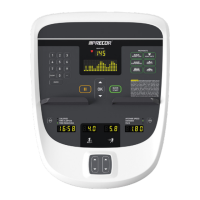
With the banner scrolling, press keys
PAUSE,5,6,5,1,5,6,5, sequentially.
DIAGS-SET CLUB PARAMETERS will scroll across the display followed
by select LANGUAGE.
Use the , keys to toggle between the available
languages.
A list of available languages will be displayed, including
ENGLISH
DEUTSCH
ESPANOL
FRANCAIS
NEDERLANDS
PORTUGUES
RUCCKIJI
ITALIANO
Note: When the default language is changed to anything other than
English, the submenus will remain in English.
Press the OK key to select desired language and
exit to Club Settings.
Use the , keys to toggle between U.S and
METRIC.
U.S (miles per hour) and METRIC (kilometers per hour) will be
displayed.
Press the OK key to select desired unit exit to Club
Settings.
SET MAX WORKOUT TIME will be displayed.
Use the , keys to select the maximum time a
user can remain in a program.
As the , keys are pressed, the displayed value increments or
decrements between 1 and 240 minutes, and NO LIMIT. If an arrow key
is held down then the value changes slowly at first and then at an
increasing rate.




 To Next Page
