34 A26361-K878-Z102-2-7619
Installing/Removing the Server into/from the Rack Hardware Installation
Ê Repeat the steps with the right telescopic rail (to be mounted on the right
support uprights).
Ê Mount the server (see section “Installing the Server” on page 34).
4.3.6 Installing the Server
Ê Pull out the mounted telescopic rails completely. The internal rails must click
into place so that you can no longer push them back.
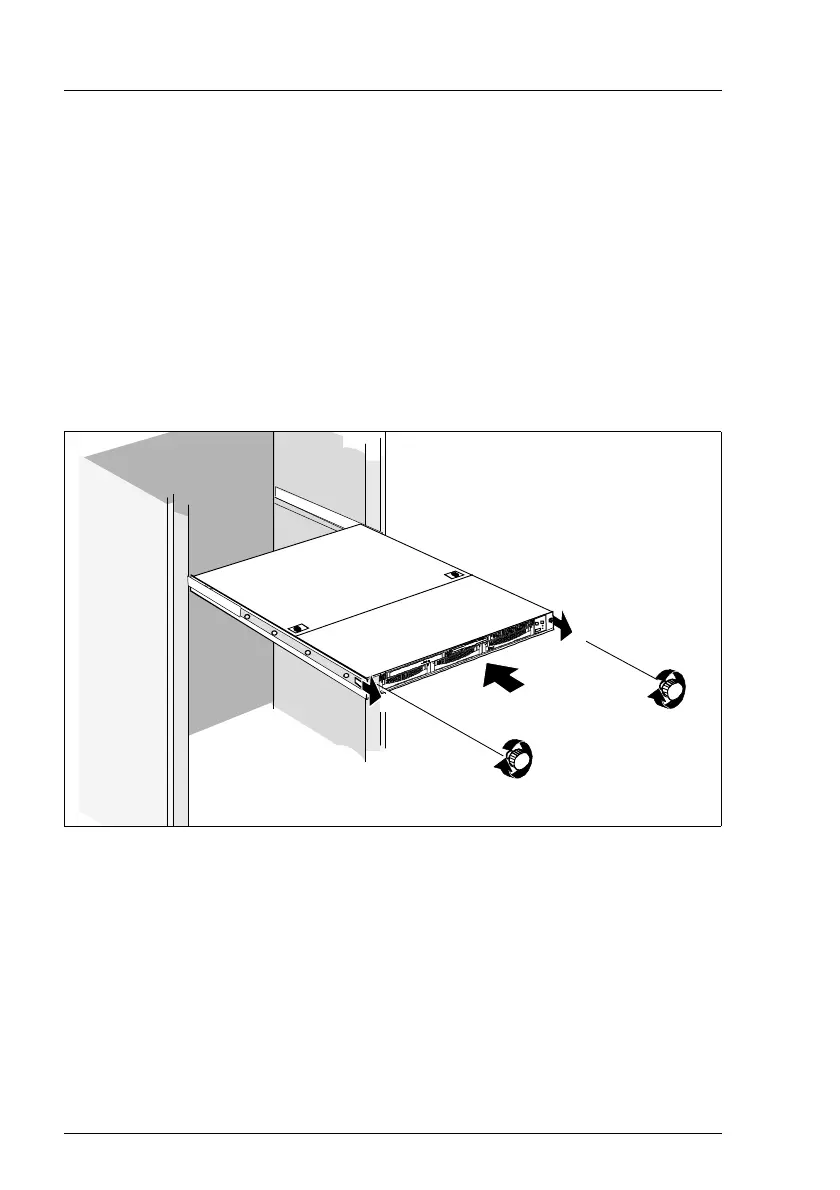
Ê Insert the prepared server (see section “Preparing the Server” on page 28)
into the projecting telescopic rails until the telescopic bars click into place.
Figure 13: Fitting the Server in the Rack
Ê Pull the white lever of both telescopic bars (see also figure 5) in the direction
of the server front (1).
Ê Slide the server into the rack (2).
I After you have inserted the server, you should pull out the server
again completely and insert it again into the rack. Thus it is
guaranteed that the server runs cleanly in the telescopic rails.
Ê Fasten the server (front panel) using two knurled screws (3).
1
3
3
2
1



 To Next Page