36 A26361-K878-Z102-2-7619
Connecting Devices to the Rack Model Hardware Installation
4.4 Connecting Devices to the Rack Model
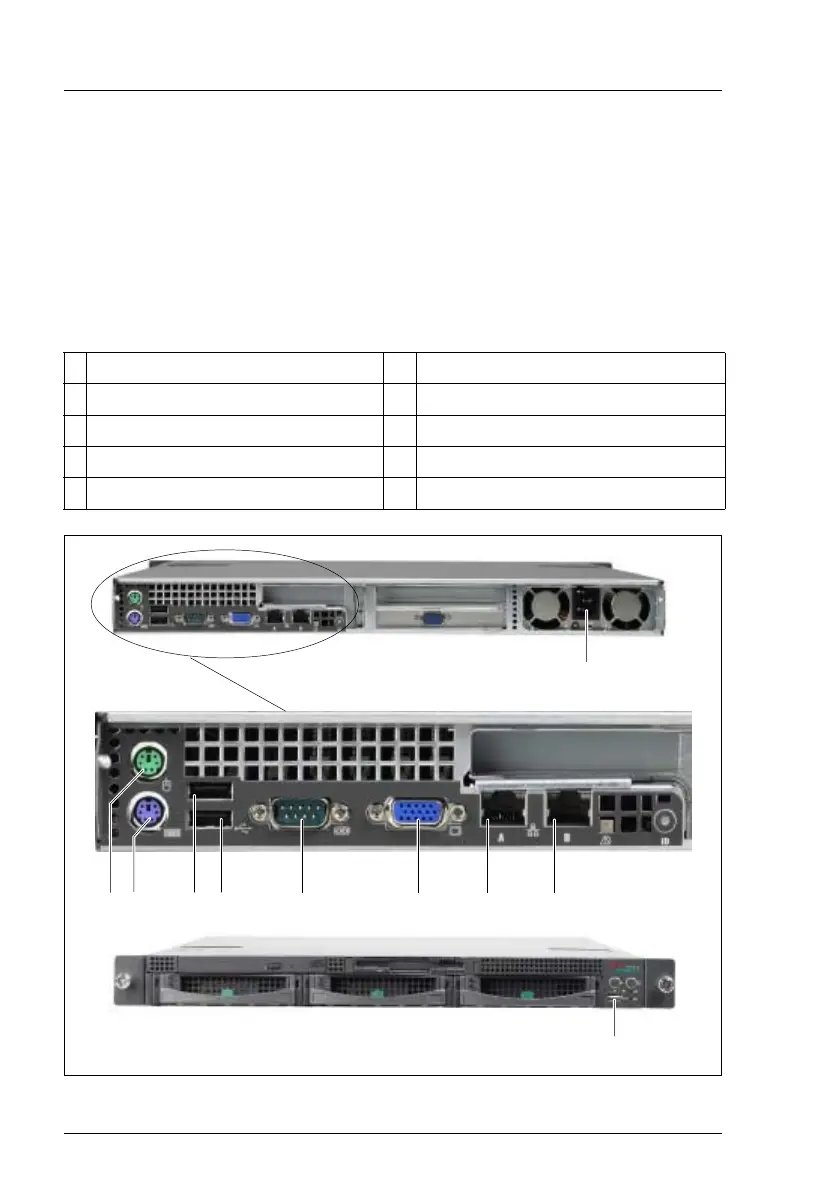
The ports for external devices are on the rear of the server. You find an
additional USB port (position 10 in figure 14) on the front of the server. Which
additional ports are available on your server depends on the PCI boards
installed.
The standard ports (figure 14) are marked with symbols, and some are color-
coded:
Figure 14: Connections
1 Mouse (PS/2) (green) 6 Monitor port (VGA) (blue)
2 Keyboard port (PS/2) (purple) 7 LAN A (10/100/1000 MBps)
3 USB 1 8 LAN B (10/100/1000 MBps)
4 USB 2 9 Mains Connection
5 Serial port COM1 10 USB on the front
152634 78
9
10



 To Next Page