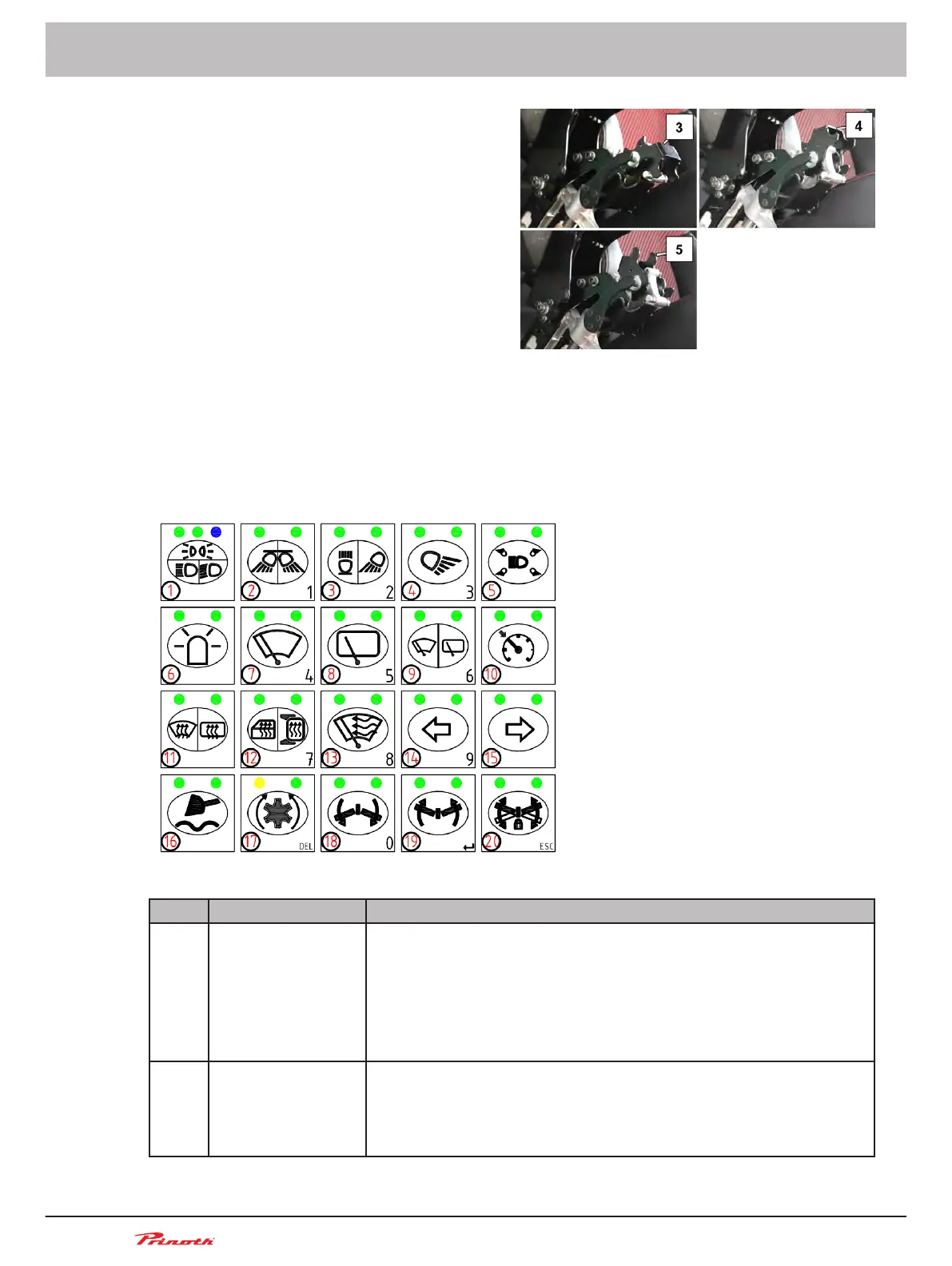
2. Pull down the lever (2) and position the
bracket support (6) in one of the three set-
tings available: control console down (3),
horizontal (4) and up (5).
3. Pull down the lever (2) and fold down the control console until it locks into place.
Folding up and down the control console
■ Pull down the lever (2) and fold up the control console until it locks into place.
■ Pull down the lever (2) and fold down the control console until it locks into place.
Keyboard 1
Figure 16: Controls on Keyboard 1 (A36)
Pos. Name Description
A36/ 1 Push-button: Park-
ing lights / low
beam / high beam
■ Press push-button once = parking light ON
■
Press push-button again = low beam ON
■ Press push-button again = high beam ON
■ Tap push-button (with high beam ON) = switch between low and
high beam
■ Press the push-button for 2 s = OFF
A36/ 2 Push-button: Work
lights front/rear
■ Press push-button once = work light front/rear ON
■
Press push-button again = work light front ON
■ Press push-button again = work light rear ON
■ Press push-button for 2 s = work lights OFF
Operating and Maintenance Manual
Snow groomer BISON
56 (255)
5 - Vehicle
BISON 908930245 - 30367
■
5.9.2



 To Next Page