13
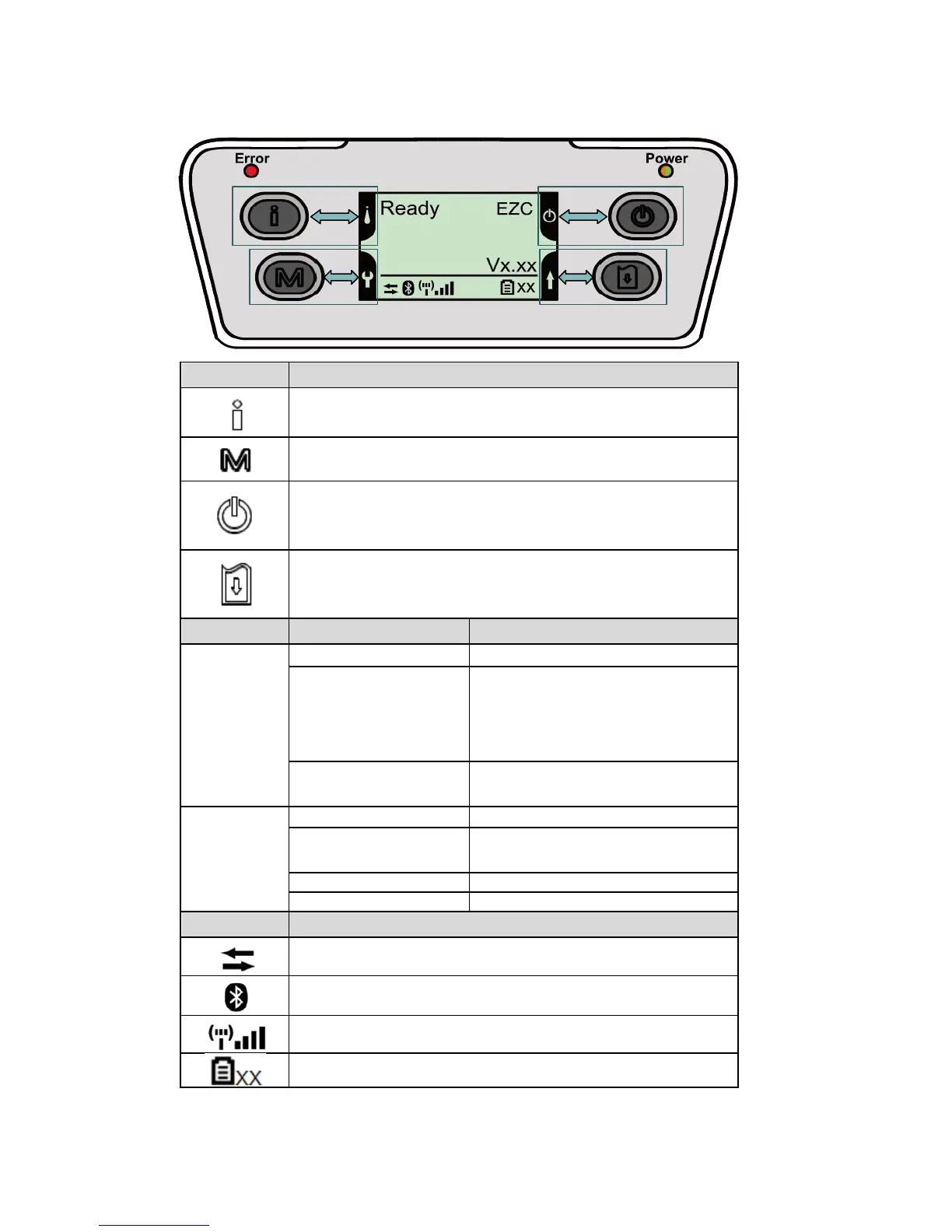
LCD Display
Keys Function
−Display the printer information
−Key for setting LCD configuration menu
−Enter the printer configuration menu
−Key for setting LCD configuration menu
−Press and hold for 2-3 seconds to turn on the printer
−Press and hold for 2-3 seconds to turn off the printer
−Key for setting LCD configuration menu
−Ready status: Feed one label
−Printing status: Pause the print job
−Key for setting LCD configuration menu
LEDs Status Indication
Error
Off Printer is ready
Red (solid)
−Media cover is open
−Out of memory
−Clean data
−Printer is busy
Red (blinking)
−No paper
−Paper jam
Power
Off Printer power is turned off
Green (solid)
−Printer power is turned on
−Battery is fully charged
Green (blinking) Low battery
Amber (solid) Battery is charging
LCD Indication
Printer has been connected with cable
Bluetooth devices have been paired
Wi-Fi device has been connected
Battery capacity %
Note: Refer to Section 6 for additional LCD Display details















 To Next Page